Restock emails go to people who raised their hand. They looked at a specific product, found it sold out, and asked to be told when it was back. That is as warm as marketing gets, which makes the question of whether to add a discount code genuinely awkward. Vendors who sell the feature say a code helps close the sale. Others argue that waiting customers already want the product at full price and a code just hands margin away. We looked for solid data on discount codes in back-in-stock emails and did not find any, so this post is a way to decide, not a verdict.
The Case For
A discount can make sense when something stands between the shopper and the order. Items with high cart-abandonment risk, slower-moving products, and stock you would like to clear are the usual candidates. A time-limited code also gives a hesitant subscriber a reason to act now and not bookmark the page. And if the price went up while someone waited, a small perk can soften the experience; we cover that scenario in our post on whether a restock email should mention a price change.
The Case Against
Scarce, high-demand products rarely need one. If 300 people are waiting for 40 units, a discount reduces revenue on units that would have sold anyway. There is also a behavioral cost. If subscribers learn that signing up reliably produces a code, some will join your lists for the code and not the product, and waiting becomes a way to get a deal. Finally, it is easy to look at orders from a discounted email and call it a success while ignoring the margin given up on buyers who did not need the nudge.
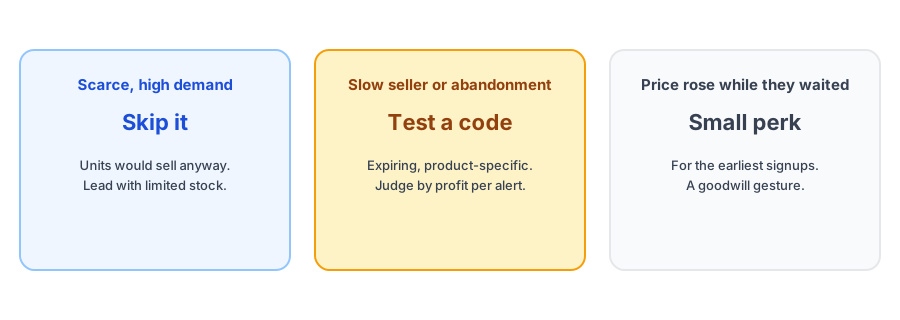
A Simple Way to Decide
- High demand and few units: skip the discount. Use scarcity and a clear message that stock is limited.
- Slow seller, overstock or a long waitlist that did not convert: a limited-time code is worth testing.
- Price rose during the wait: consider a small perk for earliest subscribers, as a goodwill gesture.
- Strong repeat customers: consider early access instead of money, such as notifying them first.
Whatever you decide, start by capturing the demand. Griffin adds Notify Me to sold-out products.
Install Griffin on ShopifyAlternatives to a Discount
You can often get the same push without lowering the price. Early access for the longest-waiting subscribers rewards them without discounting. Clear urgency about how many units arrived gives people a reason to move. Bundling or free shipping above a threshold can lift order value instead of lowering it. And simply making the email excellent helps; our guide to back-in-stock email copy and design covers what moves people.
If You Do Use a Code
- Make it expire, so it creates urgency and cannot be used months later.
- Limit it to the specific product or variant that restocked.
- Prefer one-use or customer-specific codes over a shared public code, which can leak to coupon sites.
- Test the code in your Shopify admin before it goes out.
- Consider an automatic discount if you do not need to tie it to individual subscribers.
Not every restock app can attach a discount code to its emails. Check that yours can before you build a plan around it.
Think About Fairness Within the List
A waitlist is not uniform. Some people signed up the day the product sold out and have waited weeks, while others joined an hour ago. Sending everyone the same code can feel generous to the newcomers and thin to the people who waited longest. If you reward anyone, consider the earliest signups first, and be careful about promising a discount in advance, since it turns every future restock into an expectation. It is also worth keeping the tone of the email honest: tell people why they are hearing from you and what, if anything, they get for having waited, in plain terms.
Measure Profit, Not Just Orders
The right test is profit per alert sent. Take the orders that followed the alert, subtract what you gave away in discounts and the cost of goods, and divide by the number of alerts. Compare a restock with a discount against a comparable one without. Recovered revenue is only meaningful if it is counted after discounts, which is how Griffin calculates it, and our post on measuring restock revenue explains the traps in attribution. Because restocks differ so much by product, expect noisy results from a small number of tests.
FAQ
Should every back-in-stock email include a discount?
No. Shoppers who asked to be notified already want the product. A discount is worth considering for slower sellers or items with high abandonment, and is usually unnecessary for scarce, high-demand items.
Will offering discounts teach customers to wait?
It can. If subscribers learn that signing up reliably produces a code, some will join the list for the discount and not the product. That is a reason to use discounts selectively.
What is the safest way to run a restock discount?
Use a code that expires, limit it to the specific product, and test it before sending. Avoid shared public codes that can leak to coupon sites. Automatic discounts are an alternative when you do not need a code.
How do I know if a discount worked?
Compare profit per alert sent, not just conversion. A discount that raises orders but lowers margin can leave you worse off.
The Bottom Line
A restock discount is a tool for a specific situation, not a default. Skip it for scarce items, test it on slow ones, prefer expiring product-specific codes, and judge it by profit per alert. Griffin is a Shopify back-in-stock app you can install from the Shopify App Store, free to start.