Most restock advice assumes the merchant owns the shelf. A dropshipper does not. The stock sits with a supplier, the store holds a copy of that supplier's availability, and the two are connected by a sync. That one fact changes almost everything about back-in-stock alerts. Back-in-stock alerts in a dropshipping store are no different in how they are triggered, but the signal that triggers them travels further and can be late, wrong or both.
Where the Signal Comes From
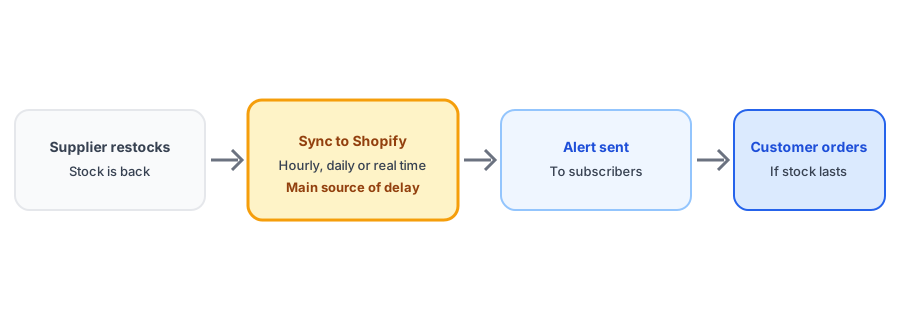
In a normal store, someone receives a delivery and updates the count. In a dropshipping store, a sync app, a feed or the supplier's own integration does it for you. Depending on the supplier, that sync may run hourly, daily or whenever the supplier pushes a change, and some suppliers update your store the moment their stock changes. From Shopify's point of view an inventory change is an inventory change, whoever made it, so a back-in-stock app reacts to the sync exactly as it would to a person typing a number.
The practical consequence is that your alert can never be faster than your sync. A product might come back at the supplier in the morning and not reach your store until the next scheduled sync. Subscribers wait that extra time, and for popular items the supplier's stock can be gone again before the alert arrives.
Three Ways It Goes Wrong
Late alerts
A slow sync delays everything downstream. If your supplier updates daily and your sync app checks once a day, subscribers can wait a full day or more after the item is actually available. Match your sync frequency to how quickly your products sell out.
Alerts for stock that barely exists
Supplier feeds vary in how they report availability. Some give exact quantities, while others use coarse flags or placeholder numbers. A product that looks well stocked in your store can have a handful of units in reality. If your alert fires for hundreds of subscribers and the supplier has five, most of them will click through to a product that cannot be fulfilled. This is a close relative of the problem in our post on bundled products, where the reported number and the real number differ, and of the phantom-count problem in our guide to false back-in-stock alerts.
Catalog mismatches
Merchants in Shopify Community threads report supplier and store catalogs drifting apart: items missing from a supplier report, variants that no longer line up, products that changed names. A mismatch can mean a restock that your store never sees, or one it sees for the wrong variant. Reconcile your catalog with the supplier regularly.
Catch demand while the supplier is out. Griffin adds Notify Me to sold-out products and sends the alert when your inventory returns.
Install Griffin on ShopifyWhat a Dropshipper Can Do
- Find out how often your supplier updates stock, and set your sync to match rather than run slower.
- Check what the feed actually reports for quantity. If it is coarse or capped, consider a buffer, such as treating a product as in stock only above a minimum quantity.
- Test the whole chain: change stock at the supplier side if you can, or simulate it in Shopify, and time how long until a test subscriber gets the alert.
- Keep subscribers attached to your Shopify product, not to supplier codes, so a waitlist survives a supplier change. Our guide to switching back-in-stock apps covers what usually transfers.
- Decide what happens when a supplier discontinues something for good. The options are in our post on discontinued products and their subscribers.
Why Alerts Matter More for Dropshippers
Without owned inventory, you cannot simply order more when a product runs out. Your demand data is one of the few levers you have. A list of people who asked to be told when a sold-out product returns shows which items are worth chasing with your supplier or replacing with an alternative. Our post on tracking demand on out-of-stock products shows how to read that signal. We have not tested every supplier feed or sync app, so treat the test above as the real answer for your setup.
FAQ
How does a restock alert work for a dropshipped product?
Your store's inventory count is updated from the supplier by a sync app, a feed or the supplier's own integration. When that count rises above zero, a back-in-stock app can notify subscribers. The alert cannot be faster than the sync behind it.
Why did my dropshipping store send a restock alert for a product the supplier barely has?
Some supplier feeds report availability in coarse terms or with placeholder quantities, so a product can look comfortably in stock when only a few units exist. Check what your feed actually reports before trusting it to trigger alerts.
How often should I sync supplier inventory?
As often as your supplier updates and your apps allow. Hourly or daily syncs are common, and some suppliers push changes in near real time. The slower the sync, the longer subscribers wait and the more likely a product sells out again before the alert.
What happens to my waitlist if I switch suppliers?
It should survive, as long as the subscribers are tied to your Shopify product and not to a supplier code. Check this before you migrate products or relist them under new SKUs.
The Bottom Line
For a dropshipper, a restock alert is the end of a chain that starts at the supplier. Tune the sync, understand what your feed reports, and test the chain end to end. Griffin is a Shopify back-in-stock app you can install from the Shopify App Store, free to start.