Search around Shopify's own blog and app store listings and you'll find "low stock alert," "back in stock alert," "restock alert," and "inventory alert" used almost interchangeably, sometimes in the same paragraph. That's confusing if you're trying to decide between a low stock alert and a back-in-stock alert for your own store, because these aren't two names for the same feature. They notify different people, at different moments, for different reasons.
Getting this distinction right matters because using the wrong term when searching for a solution can lead you to the wrong app entirely, one built to warn you about your own inventory instead of one built to bring customers back after a sellout, or the reverse.
What a Low Stock Alert Actually Is
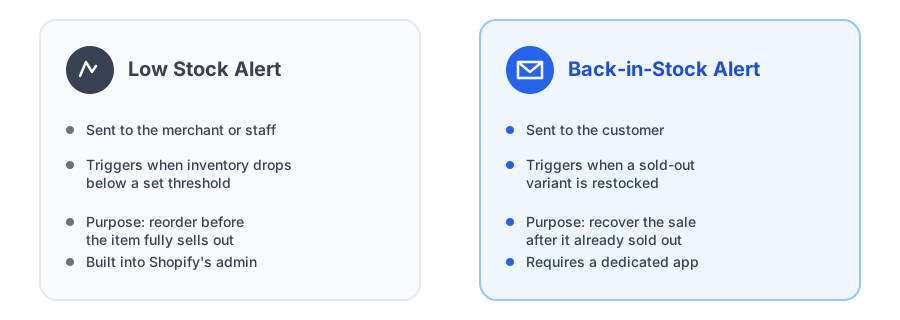
A shopify low stock notification is an internal, merchant-facing tool. Shopify's own admin lets you set an inventory threshold per product or variant, and when stock drops below that number, you or your staff get notified. The customer never sees this. It exists purely to give a merchant enough lead time to reorder before a popular item runs out completely.
This is genuinely built into Shopify already, no app required, for the basic threshold-based version. It's an operations tool, not a marketing or sales-recovery one.
What a Back-in-Stock Alert Actually Is
A back in stock alert meaning is the opposite direction entirely: it's customer-facing, not merchant-facing. A shopper hits a sold-out product page, subscribes with their email through a "Notify Me" button, and gets an automatic email once that specific variant is restocked. The merchant isn't the recipient, the customer is, and the trigger is inventory going from zero back to available, not inventory dropping toward zero.
Why the Two Get Confused
Part of the confusion is just loose language. Blog posts, app listings, and even merchants themselves use inventory alert vs restock alert somewhat interchangeably in casual conversation, even though the underlying systems serve completely different audiences. Someone searching "low stock alert app" sometimes actually means "I want to tell my customers when this comes back," simply because "stock" and "alert" are the common words in both phrases.
If you're specifically looking for Shopify's native version, it lives under each product variant's inventory settings, where you can set a threshold and turn on notifications for when it's reached. That configuration only reaches your own admin notifications, though; it has no bearing on whether customers see a "Notify Me" option once the product actually sells out.
| Situation | Low stock alert | Back-in-stock alert |
|---|---|---|
| Who receives it | Merchant or staff | Customer |
| Trigger | Inventory drops below a threshold | Sold-out variant is restocked |
| Purpose | Reorder before running out | Recover the sale after selling out |
| Native to Shopify | Yes, basic threshold alerts | No, requires an app |
See how a customer-facing "Notify Me" widget looks on your sold-out product pages, free to start.
Install Griffin on ShopifyWhich One Your Store Actually Needs
Most stores benefit from both, because they solve problems on opposite sides of the same sellout. A low stock alert protects you from ever fully running out in the first place, giving you lead time to reorder while some stock remains. A back-in-stock alert is the recovery plan for when you do run out anyway, capturing the customers who showed up wanting to buy and giving you a way to bring them back once you've restocked.
If you only set up one, a back-in-stock alert usually has the more direct revenue impact, since it's recovering sales you'd otherwise lose outright. But pairing it with a low stock threshold on your best sellers means fewer sellouts happen in the first place, which is the better outcome when it's achievable.
FAQ
Is a low stock alert the same as a back-in-stock alert?
No. A low stock alert notifies a merchant when inventory drops below a set threshold, so they can reorder before running out. A back-in-stock alert notifies a customer once a sold-out product is restocked, so they can come back and buy it.
Does Shopify have a built-in low stock alert feature?
Yes, Shopify's admin supports setting an inventory threshold per product that triggers a notification to the merchant when stock falls below it. This is separate from and doesn't include a customer-facing restock alert.
Do I need both low stock alerts and back-in-stock alerts?
Most stores benefit from both, since they solve different problems. Low stock alerts help you reorder before you fully sell out, while back-in-stock alerts recover the specific customers who already tried to buy while you were out.
Will a back-in-stock alert tell me when to reorder inventory?
Not directly, though subscriber counts on a sold-out product can indicate demand. For a dedicated reorder-timing signal before you run out entirely, a low stock alert on the merchant side is the more direct tool.
The Bottom Line
Low stock alerts and back-in-stock alerts aren't competing tools, they're solving two different halves of the same problem: staying stocked in the first place, and recovering gracefully when you aren't. Shopify already covers the merchant-facing half natively. The customer-facing half, actually bringing shoppers back after a sellout, is where a dedicated app does the work Shopify doesn't.
Ready to set up the customer-facing side? Griffin installs a variant-aware "Notify Me" widget with no theme code edits required, and our guide on adding a back-in-stock button to your store walks through the full setup. Install Griffin on the Shopify App Store to get started free.