Open your best-selling product that is currently sold out. What does a shopper see? For many Shopify stores, a grey button and nothing else. That page may have taken real effort and money to bring someone to, and it just ends. This checklist helps you score your sold-out product page and fix what's missing in an afternoon. Tick the boxes that are true for your page, get a score, and follow the links for the items you are missing.
The 10-Point Checklist
Why These Ten
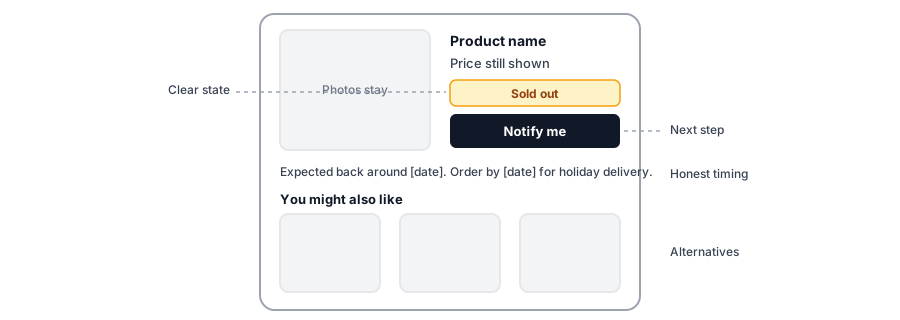
Each item answers a question the shopper has when they land on a page they cannot buy from. Is this really sold out? Can I be told when it returns, for the option I want? How long will I wait? Is there something else I could buy now? The first four items keep the door open. The next three answer the timing and alternatives questions. The last three are quality checks that determine whether the page works for everyone.
Item three and four on the list: Griffin adds Notify Me to sold-out variants, as a popup or an inline form.
Install Griffin on ShopifyHow to Read Your Score
The score is a guide, not a grade. A page can score nine out of ten and still lose shoppers if the one missing item is the Notify Me option, because that is the item that converts a visitor into a signup. Weight the items by what you sell. A store with long lead times should care most about the timing note and the signup. A store with many similar products should care most about alternatives. A store that advertises should care about feeds and availability. If you cannot tick an item because you are unsure, treat it as unticked and test it on your own page, on a phone, as a shopper would.
The Fastest Fixes
- If you scored low on the basics, start with keeping the page live and adding a Notify Me option. Those two changes alone turn most dead ends into a signup, and our complete guide covers the whole setup.
- If you sell variants, test the size and color switcher on a real phone; it is the most common place for the button to fail.
- If you advertise, check that feeds and pages agree about availability before you spend more.
Griffin supports both a Notify Me button that opens a popup and an inline form, and it ties each signup to the variant the shopper chose. For anything else on this list, such as showing alternatives or restock timing, you will use your theme, Shopify settings or other apps, because Griffin focuses on the alert itself.
Run It Again Before Busy Seasons
Sold-out pages matter most when volume is highest. Run this checklist again before the holidays; our guide to holiday stockouts and shipping cutoffs adds the timing questions that matter for gifts, and the lost-sales calculator helps you size what a better page could recover.
FAQ
What should a sold-out product page include?
A clear sold-out state, a way to be notified when it returns, honest information about timing, the product details and price, and a path to similar products. It should also stay live, accessible and easy to use on a phone.
Should I remove the add-to-cart button on a sold-out page?
Replace it with something useful. A disabled grey button with no explanation is a dead end; a clear sold-out label plus a Notify Me option gives shoppers a next step.
Is it bad for SEO to leave a sold-out page live?
Usually it is better than removing it. A live page keeps its URL, history and links, and search engines can read its availability. Remove pages only for products that will never return.
How often should I audit sold-out pages?
Check your best sellers whenever they sell out, and run through the full checklist before each busy season.
The Bottom Line
A sold-out page should still sell something: a signup, an alternative, or confidence that you are worth waiting for. Score yours, fix the top three gaps, and run it again before your busy season. Griffin is a Shopify back-in-stock app you can install from the Shopify App Store, free to start.