Apparel stockouts rarely look like one clean event. A jacket does not sell out; the medium sells out, then the small, and the large lingers for weeks. By the time the product page is full of crossed-out sizes, the shoppers who wanted the missing ones have already left to look elsewhere. Back-in-stock alerts for apparel need to work at the level of the size, because that is the level at which fashion actually sells out.
Why Apparel Breaks Size by Size
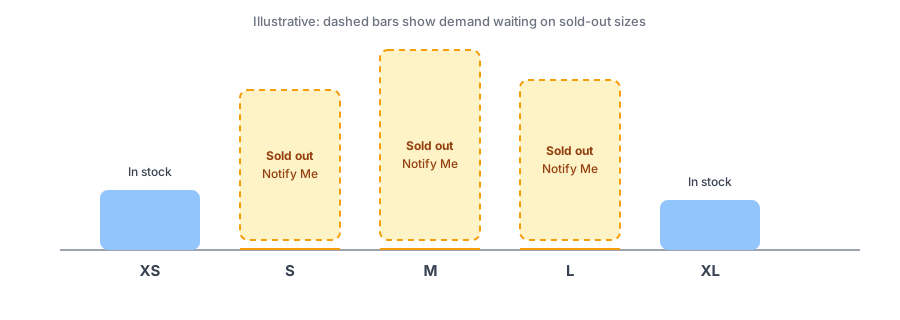
Size distribution is uneven. The middle of the range tends to sell first, the extremes sell slowly, and a delivery that arrives in a fixed ratio of sizes never quite matches what shoppers want. The result is the broken size run: a product that is technically in stock but has none of the sizes most people need. A shopper looking at a page with only the smallest and largest sizes left will often assume the item is gone for good, or will not bother to check back. A Notify Me option on each missing size changes that, because it turns an apparent dead end into a request you can act on. Streetwear brands face a version of this around drops, which we cover in our post on streetwear and sneaker drops. This post is about everyday apparel, where there is no drop date and the pattern is steady, uneven attrition.
Signups Should Follow the Size
A shopper who chose a medium wants to hear about the medium. That sounds obvious, but it has consequences. The signup needs to be recorded against the variant, the restock check needs to match that variant, and the email needs to name the size and link to it. Griffin ties each signup to the variant the shopper chose, notifies only the subscribers of the variant that restocked, and links the email straight to that variant on your product page. If one size is restocked, subscribers waiting on other sizes of the same product are not told.
This also makes the data useful. When you can see how many people are waiting on each size, your next order stops being a guess about the size curve and starts reflecting actual missed demand. Our post on tracking demand on out-of-stock products shows how to read it.
Catch the size they actually wanted. Griffin adds Notify Me to each sold-out size and notifies by variant.
Install Griffin on ShopifyThree Apparel Quirks Worth Planning For
Returns put sizes back on the shelf
Fit-driven returns are a normal part of fashion, and a returned item can go straight back into inventory. If the size had a waitlist, a single returned unit can raise the count above zero and trigger alerts to everyone waiting, who then find it gone again within minutes. Decide how returns are restocked for sizes with active lists, and read our guide to limited restocks and waitlists for how to handle few units and many people. The same mechanism can raise a count with nothing physically on the shelf, which we explain in our post on false back-in-stock alerts.
Shoppers sign up for two sizes
Someone between a medium and a large will often ask to be told about both. That is sensible, and the cost is two possible emails for one shopper. Make each email clearly about one size and keep the product page accurate about what is currently available, so they can decide quickly when one comes back.
Seasonal ends
Many apparel lines are seasonal. A size that sold out in the middle of the season may never be produced again. Tell shoppers when a restock is unlikely, and have a plan for the list at the end of the season; the options are in our post on discontinued products and their subscribers.
A Practical Setup Checklist
- Confirm the Notify Me button appears on each sold-out size even when other sizes of the product are still in stock. If it disappears when a shopper switches sizes, see our post on that behavior.
- Check that the restock email names the size and links to that variant.
- Review how returns are put back into inventory for sizes with waiting subscribers.
- Use the per-size waitlist counts when you plan reorders and size ratios.
- Say clearly when a size will not be coming back.
FAQ
Should a restock alert be tied to a size or to the whole product?
To the size. A shopper waiting on a medium should hear when the medium returns, not when a large does. Size-level signups also give you cleaner demand data for reordering.
What is a broken size run?
It is a product where some sizes have sold out and others remain, typically leaving the extremes in stock and the popular middle sizes gone. It makes the item look picked over and is where most restock demand sits.
Can a customer return restock a size and trigger an alert?
Yes. If a returned item goes back into inventory, that size's count rises and subscribers can be notified, even for a single unit. Decide how returns are processed for sizes with active waitlists.
What if a shopper is not sure whether to wait for a medium or a large?
They can sign up for both. That is reasonable behavior, so make the restock email clear about which size it is for and let the page show current availability so they can decide.
The Bottom Line
In apparel, the product rarely sells out; a size does. Tie signups to the size, plan for returns that restock a single unit, and use the waitlist to shape your next order. Griffin is a Shopify back-in-stock app you can install from the Shopify App Store, free to start.