A merchant tests their back-in-stock setup by loading a sold-out product page straight from a link, and the Notify Me button shows up right where it should. Satisfied, they move on. Then a real shopper lands on the same product on an in-stock size, clicks through a couple of other sizes out of curiosity, lands back on the sold-out one, and sees nothing: no button, no way to sign up, just a disabled Add to Cart. Nothing about the setup changed between those two visits. When the back-in-stock button disappears on a variant switch, the cause is less about configuration and more about when the app's script actually runs.
Why the Button Works on Load but Not After Switching
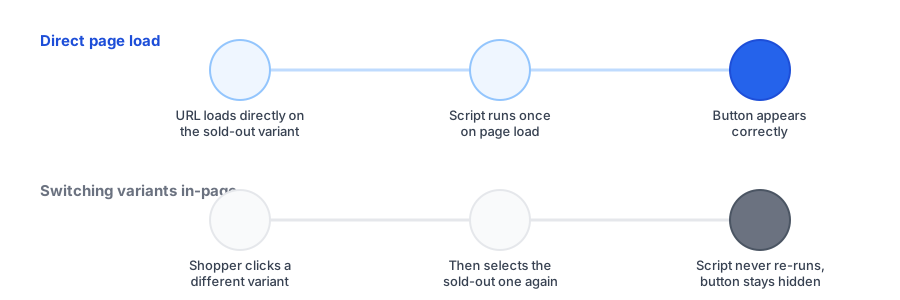
Most back-in-stock widgets check a product's stock status once, when the page first finishes loading, then decide whether to inject the Notify Me button. On a direct page load, that check runs against whatever variant is active at that moment, which is why testing by loading straight into a sold-out variant tends to work. The failure shows up when the shopper changes variants: Shopify themes normally switch variants client-side, swapping price, images, and availability without a full page reload. If the back-in-stock script only ever ran its check once on that initial load, it has no reason to run again just because the shopper picked a different option from a dropdown or swatch list.
The result is a script that's technically working, just not watching for the right moment. The button that correctly appeared on a fresh load simply never gets a second chance to appear once the page is already open and the shopper is clicking around inside it.
The Related Edge Case: A Variant That Can't Be Selected
A second, related failure shows up when a product page loads directly on a sold-out variant that the theme won't actually let become the selected option. Some theme implementations treat an out-of-stock variant as effectively unselectable in the picker UI, which means the back-in-stock script never gets a clean signal that says "this specific variant is both chosen and sold out." A back in stock button sold out variant not selectable case like this can look identical to the variant-switch bug from the outside, a missing button, but the underlying cause is different: it's not that the script failed to re-run, it's that the variant state it needed to check never got set in the first place.
Test your own store's variant switching before assuming the setup is correct.
Install Griffin on ShopifyHow to Tell If This Is Happening on Your Store
The test here is different from checking whether the button shows up at all. To catch this specific bug:
- Load the product page directly on a variant that's currently in stock, not the sold-out one.
- Use the on-page variant picker to select the sold-out variant, without reloading or navigating away.
- Watch for the button. If it doesn't appear here but does appear when you load the sold-out variant's URL directly, you've confirmed a shopify theme variant javascript back in stock issue tied to client-side switching, not a configuration problem.
What a Real Fix Looks Like
The general fix is for the back-in-stock app's script to listen for the theme's variant-change event, not just the page's initial load event, and re-run its sold-out check every time that event fires. This is genuinely theme-dependent: some older or heavily customized themes don't dispatch a consistent variant-change event at all, which is part of why some back-in-stock and email-marketing integrations explicitly limit support to default or lightly modified themes rather than guaranteeing compatibility with every custom build. If you're running a custom theme, it's worth confirming directly with your back-in-stock app's support team that their widget re-binds on variant change, rather than assuming it does because the button worked the first time you tested it.
FAQ
Why does the back-in-stock button show up on reload but not when I click a different variant?
Many back-in-stock scripts only check whether a variant is sold out once, when the page first loads. Shopify themes typically switch variants without a full page reload, so if the script never re-runs on that change, the button doesn't update to match the newly selected variant.
What if the product page loads directly on a sold-out variant and the button still never shows?
That's a related but separate case. If the theme doesn't let an out-of-stock variant become the actively selected option on load, the script may never receive a clear signal that this variant is both selected and sold out.
Is this the same issue as the button requiring every variant to be sold out?
No. That issue is about whether the button appears at all, based on the product's overall stock status. This one is about an already-working button failing to update after a shopper interacts with the variant picker on the same page.
How do I check if my theme has this specific bug?
Load a product page directly on an in-stock variant, then use the on-page variant picker to select a sold-out variant without reloading the page, and see whether the Notify Me button appears.
The Bottom Line
A back-in-stock button that works on a fresh page load can still be failing most of your real traffic, since most shoppers arrive on one variant and click around before landing on the one they actually want. Testing by switching variants in place, not just by loading a sold-out URL directly, is the only way to catch this before it quietly costs you signups.
For the other common trigger-condition gotcha, see our post on why the button sometimes requires every variant to be sold out. Griffin's variant-aware widget is built to track the specific variant a shopper has selected. Install Griffin on the Shopify App Store to test it on your own theme, free to start.