On Shopify a product is a container, and the thing that actually sells out is a variant: a size, a color, a pack size, a finish. A shopper does not want to buy "the jacket". They want the medium in navy. A back-in-stock alert that ignores that difference creates a particular kind of disappointment, and it is worth understanding before you choose an app. Variant-level back-in-stock alerts are not a luxury feature for large catalogs. They are the difference between an email that helps and one that sends people on a pointless click. This post explains the two models and how to tell which one you have.
What a Variant Is, and Why It Matters
A Shopify product can have up to three option dimensions, such as size, color and material, and each combination is a variant with its own SKU, price and inventory. Stock is counted per variant. A jacket can be sold out in small and large and available in medium, all at once. Because inventory is per variant, the question of when something is back in stock is only meaningful at the variant level. "The jacket is back" is vague, and it can be true for one size and false for the rest.
How Product-Level Alerts Go Wrong
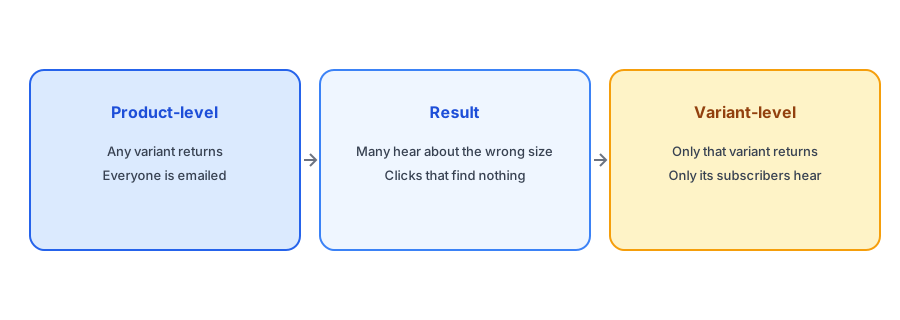
A product-level alert attaches the shopper's request to the product as a whole. When any variant returns, everyone who signed up is told. Suppose forty people are waiting for the product, split across five sizes, and only the medium comes back. Forty emails go out. Perhaps eight people wanted a medium. The other thirty-two click through, find their size still unavailable and learn that your alerts are unreliable. Some will unsubscribe and some will mark the emails as spam, which damages deliverability for everyone. The numbers in this example are illustrative, not data from a real store.
How Variant-Level Alerts Work
A variant-level alert records which variant the shopper chose when they signed up. When that variant returns to stock, only its subscribers are emailed, and the link goes straight to it. Griffin works this way: each signup is tied to the variant the shopper selected, and it notifies only that variant's subscribers when it is restocked. The result is fewer emails, a higher chance that each one is relevant and less risk to your sender reputation. It also gives you better demand data, because you can see which sizes and colors people actually want.
Tell shoppers when their size is back, not just that something is. Griffin is variant-aware and free to start.
Install Griffin on ShopifyThe Form Has to Know the Variant Too
A variant-aware alert only works if the signup form captures the variant. If the shopper has already selected a size and color before seeing it is sold out, the form should take that choice automatically. If they have not, it should ask. A form that fails to update when the shopper switches variants is a common source of wrong signups; our post on why the button can disappear when a shopper switches variants explains the failure, and our guide to Notify Me form fields explains when a picker is worth adding.
Where It Matters Most
Variant precision matters most in categories where size, fit or compatibility decide the purchase. Apparel is the obvious case; see our post on size-specific restocks and broken size runs. Auto parts depend on exact fitment, as covered in our post on alerts for auto parts stores. Food and craft products use variants for sizes, flavors and colors. If your products have only one variant, the difference disappears, but most catalogs have at least a few products where it matters.
How to Tell Which Model Your App Uses
You can find out in a few minutes. Sign up for one variant of a multi-variant test product, then restock a different variant and see whether you get an email. If you do, the app is product-level. If you do not, it is variant-level. Our post on testing your back-in-stock setup walks through the full test, and our guide to evaluating a back-in-stock app puts the question in a wider checklist.
A Practical Checklist
- Check whether your app records the variant a shopper chose.
- Test by restocking a different variant and confirming no email arrives.
- Make sure the form updates when the shopper switches variants.
- Use per-variant signup counts to decide what to reorder.
- Link the restock email to the exact variant that returned.
FAQ
What is a variant-level back-in-stock alert?
An alert tied to the specific size, color or option a shopper chose, so only that variant's subscribers are notified when it returns.
Why are product-level alerts a problem?
They notify everyone when any variant returns, so many shoppers hear about a size or color they do not want and find nothing to buy.
Does Griffin send variant-level alerts?
Yes. Griffin ties each signup to the chosen variant and notifies only that variant's subscribers when it is restocked.
How can I test which kind my app sends?
Sign up for one variant, restock a different one and see whether an email arrives. If it does not, the app is variant-level.
The Bottom Line
Stock is counted per variant, so alerts should be too. A precise alert is a useful one. Griffin is a Shopify back-in-stock app you can install from the Shopify App Store, free to start.