A sold-out hoodie usually loses the sale within minutes. A sold-out ring is different. Jewelry, especially handmade or one-of-a-kind pieces, is often a considered purchase tied to an anniversary, a proposal, or a gift someone has been planning for weeks. That gives jewelry stores something most categories don't get: a shopper who is genuinely willing to wait, if there's a way to tell them the piece is back.
The problem is that most Shopify stores treat every sold-out product the same way, whether it's a fast-moving basic or a one-of-a-kind handmade piece. Jewelry merchants are paying more attention to back-in-stock alerts because they are realizing the generic approach leaves real demand on the table.
Why Jewelry Shoppers Behave Differently When a Piece Sells Out
Jewelry purchases carry more emotional weight and a higher price point than most impulse categories, which changes the shopper's behavior when they hit a sold-out page. Instead of immediately searching for a substitute, a shopper who wanted that specific ring, that specific pendant, or that specific handmade piece is more likely to leave their email and come back later, provided the store gives them an easy way to do it.
This matters most for handmade jewelry, where pieces are often produced in small batches or one at a time. A shopper who missed a drop isn't necessarily gone. They're waiting to hear whether it's worth checking back, and a sold-out page with no next step just pushes them to a competitor instead.
The Jewelry-Specific Case for Restock Notifications
A jewelry restock notification does more than recover a single sale. It captures demand signal on pieces a merchant might otherwise assume weren't popular just because they sold through fast. For fine jewelry and engagement pieces in particular, ring size and metal finish are separate variants, and a piece can look fully in stock at the product level while the exact combination a shopper wants is unavailable.
That's why variant-level tracking matters more here than in most categories. A notification system that only tracks "in stock" or "out of stock" at the product level will tell a shopper their size 6 in white gold is available because a size 8 in yellow gold exists. The alert needs to be scoped to the exact variant someone subscribed to, or it creates a worse experience than no notification at all.
Handling One-of-a-Kind Pieces That Will Never Restock
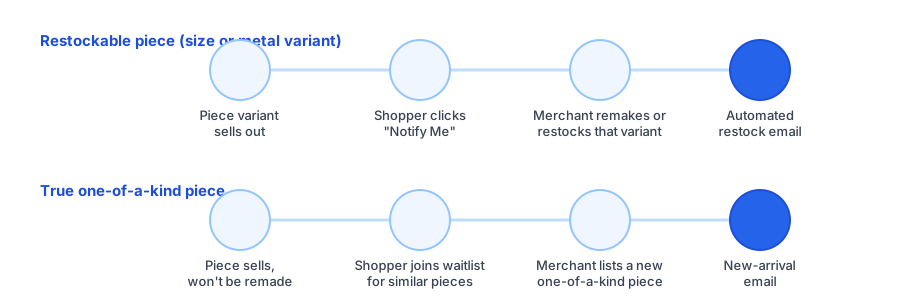
Here's where jewelry stores need a slightly different setup than a typical apparel store. A one of a kind piece sold out situation isn't the same as a standard SKU running low. If a piece was handmade as a single item, there's nothing to restock. Promising a "back in stock" alert on something that will never come back damages trust the moment a shopper realizes it.
The fix is separating the two cases at setup. For anything that can genuinely be remade or restocked, whether that's a standard ring style in a given size or a design the maker produces in small ongoing batches, a back-in-stock notify me widget is the right tool. For pieces that are truly singular, a waitlist for similar future pieces, or a general new-arrivals signup, sets the right expectation: not this exact piece, but something in the same style when it exists.
See how Griffin handles variant-level restock alerts for jewelry and other made-to-order categories, starting free.
Install Griffin on ShopifySetting Up Back-in-Stock Alerts for a Jewelry Store on Shopify
In practice, getting this right on Shopify comes down to a few decisions made once at setup, not ongoing manual work. First, make sure the notify me widget is scoped to variants, not just the parent product, so size and metal combinations are tracked separately. Second, decide upfront which product types are genuinely restockable versus one of a kind, and route the second group to a waitlist or new-arrivals list instead of a restock promise. Third, write the notification email with the purchase context in mind. A restock alert for a gift or engagement piece can afford a warmer, more personal tone than a generic "back in stock" line, since the shopper has likely been waiting for something meaningful.
None of this requires custom development. A theme app block-based widget handles the variant tracking, and most of the setup is a one-time decision about which collections or product types get a restock alert versus a waitlist prompt.
FAQ
Do jewelry shoppers actually wait around for a restock?
Many do, more than in impulse-driven categories, because jewelry is often a considered purchase tied to a specific occasion or gift. That patience only pays off if there's a way to remind the shopper once the piece is available again.
What if a piece is truly one of a kind and will never restock?
A back-in-stock alert doesn't apply, since that exact piece is gone for good. A waitlist for similar future pieces, or a general new-arrivals signup, captures that same interest without promising a restock that isn't coming.
Should a jewelry store use back-in-stock alerts or a waitlist?
Both, depending on the piece. Use back-in-stock alerts for anything that can genuinely be remade or restocked, such as a standard ring in a specific size or metal, and a waitlist for pieces that are permanently one of a kind.
Does variant-level tracking matter for jewelry?
Yes. Ring size and metal type are separate variants, and a shopper who wants a size 7 in rose gold doesn't care that size 5 in yellow gold is in stock. Notifications should be scoped to the exact variant a shopper subscribed to.
The Bottom Line
Jewelry shoppers are more patient than most, but that patience is wasted if a sold-out page offers no way to come back. The setup work is mostly a one-time decision: track variants precisely, separate restockable pieces from true one-of-a-kind items, and let each one route to the notification type that actually matches what will happen next.
If you're setting this up for the first time, Griffin installs as a lightweight app block with variant-aware notify-me subscriptions, no theme code edits required. It's also worth reading Back-in-Stock Notifications vs Waitlists to decide which flow fits each of your product lines. Install Griffin on the Shopify App Store to get started free.