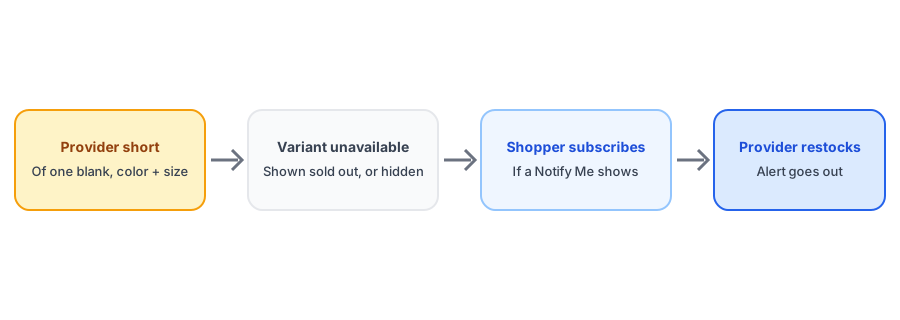
Print-on-demand looks like the opposite of a stockout problem. You hold no inventory, the product is made when someone orders it, and in theory nothing ever runs out. In practice, variants sell out all the time, because the thing that runs out is not your product but the blank it is printed on. A provider runs short of a particular color and size of a shirt or hoodie, and your listing stops being available even though your design is as good as ever. Back-in-stock alerts for print on demand are mostly about handling that unseen shortage.
Where the Stockout Really Happens
Print providers keep stock of base garments and other blanks. When a popular color in a popular size runs short, anything printed on it becomes unavailable. You do not control the shortage, you often cannot predict it, and it can last days or longer. Because the cause sits outside your store, the signal reaches you through the provider's platform, which updates your Shopify availability when stock changes. Platform documentation describes this kind of inventory sync raising the count again when the provider restocks, which in turn can trigger an alert, but treat that as the platform's own claim and confirm it on your store.
Four Things That Trip Up Print-on-Demand Stores
Variants that disappear instead of selling out
Depending on how your provider platform handles unavailable items, a variant may be hidden or removed rather than shown as sold out. Provider help pages note limits on how sold-out variants can appear on Shopify. If the variant is not displayed as sold out, there may be no Notify Me button to attach, and shoppers simply see fewer options. Check what your own product page shows for an unavailable color.
No inventory tracking
Many print-on-demand products are set up without inventory tracking because there is nothing to count. Shopify then never treats them as sold out, which is the same mechanism we describe in our post on continue selling and Notify Me buttons.
A huge variant matrix
One design in ten colors and six sizes is sixty variants. Demand usually concentrates in a few of them, and those are the ones that sell out. A list of who is waiting for which variant shows you where blank shortages actually cost you sales.
Provider switches that change the product
If you move a product to a different provider, the available colors, sizes, print quality and price can change. A subscriber waiting for a specific color may not get what they signed up for. Decide in advance how you will handle that, in the spirit of our guide to discontinued products and their subscribers.
Turn blank shortages into a waitlist. Griffin adds Notify Me to sold-out variants and sends the alert when availability returns.
Install Griffin on ShopifyMaking Alerts Work
- Look at how an unavailable variant appears on your live product page: sold out, greyed out or gone.
- Check whether inventory is tracked for these products, and whether the provider sync updates quantity or availability.
- Test with a spare email address on a variant that is currently unavailable, then watch what happens when it returns.
- Offer an alternative on the page, such as a similar color, so shoppers who do not want to wait still have a choice.
- Use the waitlist counts to decide whether a recurring shortage is worth switching providers for.
How This Differs From Dropshipping
The two models look alike because neither holds stock, and the points in our post on dropshipping stores about sync timing apply here too. The difference is the cause. A dropshipped product runs out because the supplier ran out of that product. A print-on-demand product runs out because a component of it did, and the same blank may affect many of your designs at once. That makes the waitlist useful in a different way: demand clustering around one color and size across several designs is a signal about the blank, not the design. We have not tested every provider platform, so verify the behavior on yours.
FAQ
Why would a print-on-demand product be out of stock?
Because the print provider ran short of the blank item it prints on, such as a specific color and size of a shirt or hoodie. Your design is fine, but the physical base is unavailable until the provider restocks.
Can I send back-in-stock alerts for print-on-demand variants?
Yes, if your store reflects the sold-out state of the variant. The provider's sync updates availability in Shopify, and a back-in-stock app can notify subscribers when it returns. Check how your setup marks unavailable variants.
Why is there no Notify Me button on my print-on-demand product?
Often because the variant is hidden or removed, not marked sold out, or because inventory is not tracked. A button that appears on sold-out variants has nothing to attach to in those cases.
Should I switch print providers when a blank keeps selling out?
Consider it if the shortage is frequent, but compare quality, shipping times and prices first, and decide whether subscribers should be told about a change. Your waitlist data shows which variants are worth fixing.
The Bottom Line
Print-on-demand stores do get stockouts; they just start at the provider's blanks. Check how unavailable variants appear, confirm that availability syncs, and use the waitlist to see which shortages matter. Griffin is a Shopify back-in-stock app you can install from the Shopify App Store, free to start.