Here's a report that confuses a lot of merchants: Large sells out, Small, Medium, and XL are all still available, and the Notify Me button that's supposed to appear for sold-out items never shows up anywhere on that product page. The app is installed, the embed is enabled, and every other sold-out product on the store works fine. The difference with this one is that it isn't fully sold out, just one variant, and that's exactly the condition this gotcha depends on.
Product-Level vs. Variant-Level: The Distinction That Breaks This
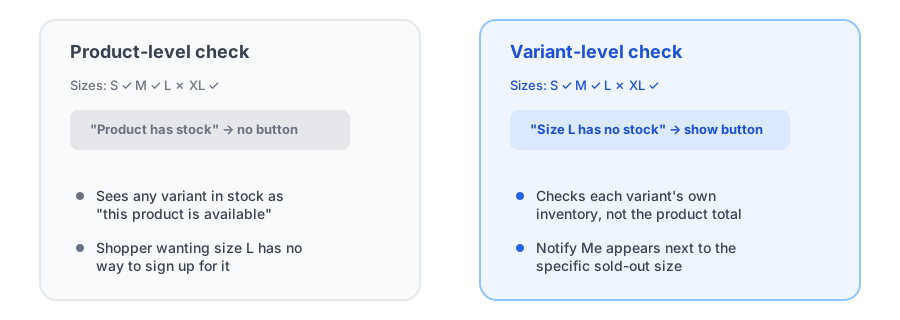
Shopify tracks inventory at the variant level, but a lot of back-in-stock apps don't make that same distinction when deciding whether to show their signup button. Some check whether the product as a whole is out of stock, meaning every single variant has zero inventory, before surfacing a Notify Me option anywhere on the page. As long as even one variant, say XL, still has stock, the app concludes the product is available and never shows a button for the specific variant that's actually sold out.
That's a shopify notify me button one variant problem in practice: the shopper who wants Large has no way to ask to be notified, even though Large is genuinely unavailable right now, because the app is looking at the product's overall status instead of that one variant's.
Why This Gotcha Is Easy to Miss During Setup
This bug hides well during normal testing. If you test your back-in-stock variant trigger by letting an entire test product sell out completely, the button shows up exactly as expected, because every variant really is at zero. Everything looks correctly configured. The gap only shows up later, on a real catalog, when a popular size or color sells out while the rest of the product stays in stock, which is actually the more common real-world scenario than a product selling out entirely all at once.
See a Notify Me widget that checks each variant on its own, not the whole product.
Install Griffin on ShopifyWhat a Variant-Aware Widget Does Differently
A genuinely variant-aware back-in-stock widget checks each variant's own inventory rather than rolling everything up into one product-level status. Griffin's Notify Me widget works this way: it evaluates the specific variant a shopper has selected, so the signup option appears next to Large the moment Large sells out, regardless of whether Small, Medium, or XL are still purchasable. That's the behavior worth confirming on any back-in-stock app before you rely on it across a catalog with real size and color variation.
How to Actually Test for This
Don't test with a product that's sold out entirely, since that will pass regardless of whether the app has this limitation. Instead:
- Pick a real multi-variant product and set just one variant's inventory to zero, leaving the others in stock.
- Visit the live product page and select that specific sold-out variant.
- Confirm the Notify Me option appears for that variant, not just a disabled Add to Cart button.
- Switch to an in-stock variant and confirm the button correctly disappears and Add to Cart returns.
If the button never shows up in that test despite the variant genuinely being sold out, the app you're using is checking product-level availability, and you've just found a shopify back in stock button not showing one size gap in a setup that otherwise looked fine.
FAQ
Why doesn't the back-in-stock button appear when only one size is sold out?
Some apps only show the button when every variant on the product is out of stock, so if any other size or color is still available, the app treats the product as in stock overall and never surfaces a signup option for the specific sold-out variant.
How do I know if my back-in-stock app checks variants correctly?
Test it on a real multi-variant product by letting just one variant sell out while the others stay in stock, then check whether the Notify Me option appears specifically for that one sold-out variant.
Does Griffin have this limitation?
No. Griffin's Notify Me widget is variant-aware, checking and tracking availability at the variant level rather than requiring the entire product to be sold out before showing a signup option.
Is this the same as the button disappearing after switching variants?
No, that's a separate problem. This issue is about whether the button ever appears for a single sold-out variant in the first place; the other is a different bug where a button that did appear stops reappearing after a shopper changes their selection on the same page.
The Bottom Line
A product that's mostly in stock with one sold-out variant is the normal case, not the edge case, for any store with real size or color variation. If your back-in-stock app only triggers when the entire product is unavailable, you're silently losing signups on exactly the products where customers care most about one specific option. Testing with a single sold-out variant, not a fully sold-out product, is the fastest way to find out before it costs you real signups.
If you're setting this up for the first time, our guide on adding a back-in-stock Notify Me button covers the basic setup. Griffin's widget tracks availability per variant from the start. Install Griffin on the Shopify App Store to see it on your own catalog, free to start.