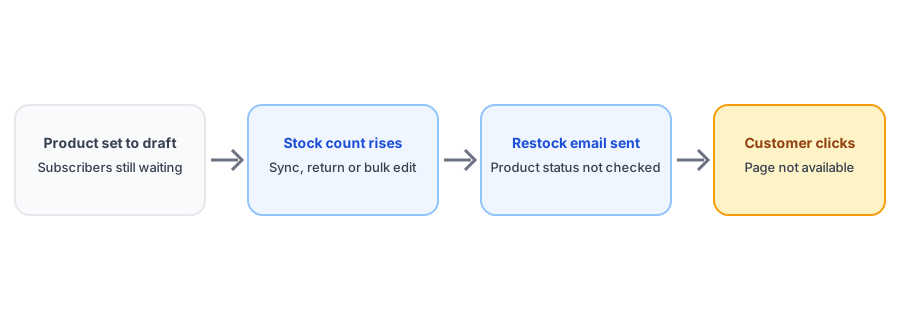
Most restock mistakes involve the wrong stock number. This one involves the wrong product state. A merchant sets an item to draft or archives it, but its inventory keeps moving, because a supplier feed updates it or a return gets counted in. The app sees stock rise on a product with a waiting list and sends the alert. Subscribers click a link to a page that no longer exists. Merchant reviews in this category describe emails going out for draft products, and one vendor publicly attributed a batch of mistaken sends to a product-status check that did not work. A back-in-stock email for a draft product is easy to prevent once you know where it comes from.
How It Happens
Shopify lets you set a product to draft or archived so shoppers cannot see it, but it does not stop the stock count from changing. A few ordinary things keep moving it:
- Supplier or warehouse syncs that update every SKU, including ones you have hidden.
- Returns and refunds that put units back into stock.
- Imports and bulk edits that rewrite inventory across the whole catalog.
- Staff correcting counts on a product while it is being reworked.
Any of these can lift a hidden product from zero to something. An app that only watches inventory, and does not check whether the product is currently visible, has no reason to hold back.
Why It Hurts More Than a Normal Mistake
A false alert about a real product is annoying. An alert about a product shoppers cannot reach is confusing. The customer clicks, lands on an error or a not-available page, and cannot tell whether you made a mistake or the product is gone for good. Either way the email has spent a little of the trust that the next one will need. It is a close cousin of the problems in our posts on false back-in-stock alerts and on duplicate restock emails, with a different cause: the product's visibility, not the number.
Test your restock alerts before a customer does. Griffin adds Notify Me to sold-out products.
Install Griffin on ShopifyHow to Prevent It
- Before drafting or archiving a product that has subscribers, decide what happens to the waitlist. Our guide to discontinued products and their subscribers covers the options, and the same thinking applies to a product you plan to bring back later.
- Pause or exclude hidden products from inventory syncs where you can, so their counts do not drift while they are unpublished.
- After a bulk edit or import, check the stock of any product you have hidden and that has an active waitlist.
- Keep products live and sold out when you want to keep collecting interest. Hiding them has other costs, which we cover in our post on out-of-stock products and SEO.
- Use a clearly named collection or tag for products that are intentionally paused so staff do not adjust their stock casually.
Draft, Archived and Unpublished Are Not the Same
It helps to know which kind of hidden you mean. A draft product has not been published at all. An archived product has been retired from the active catalog. A product can also be live in the admin but not published to the online store sales channel, which means shoppers cannot reach its page even though it looks normal on your side. An app may treat these differently, so test each one that applies to you. The one most likely to bite is the product that was live, collected a waitlist, and was then quietly unpublished during a catalog cleanup or a seasonal reset, because the subscribers are still there even though the page is not.
It is also worth checking any product you duplicated to build a new listing. A copy that starts life as a draft can inherit variants and stock levels, and if a sync or import fills in quantities before you launch it, you have the same problem on a product no customer has ever seen.
How to Test Your Own App
Do not assume your app filters by product status. Create a test product with no real stock, sell it out, and subscribe a spare email address. Set the product to draft, adjust its inventory upward, and see whether an email arrives. Repeat with the product archived. The result tells you how your setup behaves in practice. Griffin reacts to inventory changes for products with active subscribers, so run the same test on yours before relying on it; if an app does send, ask the vendor whether product status is checked and whether that can be changed.
FAQ
Can a back-in-stock app send an email about a draft product?
It can if it reacts to inventory changes without checking product status. Merchant reviews describe restock emails going out for draft products, and one vendor attributed it to a status check that failed. Test your app with a draft product and a test subscriber.
Does inventory still change on draft or archived products?
Yes. Stock can be adjusted on products that are not visible to shoppers, and supplier syncs, imports and bulk edits often keep updating them, so the count can rise even though the product is hidden.
What happens when a customer clicks a restock email for an archived product?
They usually land on an error or a not-available page. That is a worse experience than no email, because it points them at something that no longer exists.
Should I delete subscribers when I archive a product?
Not automatically. First decide what the waitlist should hear: a replacement product, a final notice, or nothing. Our discontinued-product guide walks through the options.
The Bottom Line
Hiding a product does not freeze its inventory, and an app that watches inventory can email about a product shoppers can no longer reach. Decide what the waitlist should hear before you hide a product, keep hidden products out of automatic syncs, and test your app with a draft product. Griffin is a Shopify back-in-stock app you can install from the Shopify App Store, free to start.