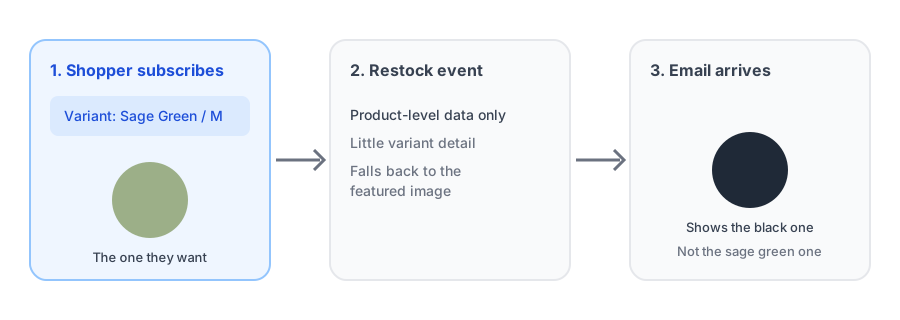
Someone signs up to be told when the sage green jacket in a medium comes back. Weeks later the email arrives, and the picture at the top is the black jacket. The subject line is right, the link may even be right, but the first thing the shopper sees says "this isn't about me." A wrong product image in a back-in-stock email is easy to dismiss as cosmetic, but the photo is the part of a restock email people read first, and it is where the message either feels personal or feels like a mass mailing.
Why the Wrong Photo Shows Up
The pattern is well documented. Merchants in Klaviyo's community forums and in app reviews describe the same thing: a customer subscribes to a specific color or variant, and the restock notification pulls the parent product's main image instead of the image for the variant they chose. The root cause is the data, not the design. By default, very little variant-specific information travels with a back-in-stock event, so the email template reaches for the one image it reliably has: the product's featured photo.
That featured photo is whatever sits first in the product's media list, which is usually the hero shot of the best-selling or most photogenic variant. Every subscriber for every other variant gets that same picture, which is how a variant image back in stock email ends up showing the wrong item for a large share of the people it goes to.
Why It Matters More Than It Looks
A restock email has one job: convert a shopper who already wanted the item. They are the warmest audience a store has, and the email is competing with a full inbox. A mismatched photo adds friction at the exact moment there should be none. The shopper has to pause, decide whether the email is really about their item, and wonder whether the link will land on the right variant. Some will click anyway. Some will assume it was a generic blast and move on, which is a lost sale from someone who signed up on purpose.
It also quietly erodes trust in the notification itself. If the first restock email a customer gets from a store looks wrong, they are less likely to rely on the next one.
How to Reduce the Mismatch
There is no single switch that fixes this on every setup, but a few practical steps shrink the problem.
- Check what your email actually shows. Subscribe to a non-default variant of a sold-out product on a test store or with a spare address, trigger a restock, and look at the email. Many merchants never do this and assume the photo is correct because the link is.
- Make the featured image representative. If one variant dominates sales, a hero shot that matches it means the mismatch hits fewer people. If a product has several equally popular variants, consider a neutral lifestyle image that does not commit to one color.
- Lean on the product name and variant label. If the image can't be trusted to match, make sure the email states the variant in plain text, such as "Sage Green / Medium", so the shopper has a second signal that the email is about their item.
- Send the click to the right variant. Even when the photo is generic, a link that opens the exact variant keeps the email useful. This is also worth testing, and it ties into how the storefront behaves when shoppers switch variants, which we cover in our post on the Notify Me button disappearing on variant switch.
- Consider turning the image off. If you can't get a reliable match, a clean text-led email with a clear variant label can beat a confident picture of the wrong product. Some apps let you hide the product image from the restock template entirely.
Griffin's restock email includes the product image by default and lets you switch it off per store, so you can choose what is right for your catalog.
Install Griffin on ShopifyWhat to Ask Any Back-in-Stock App
If you are comparing tools, or deciding whether to send restock emails through a general email platform, this is a useful question to put to the vendor: when a shopper subscribes to a specific variant, which image does the restock email use, and can I see it before I commit? Running the test described above takes ten minutes and tells you more than a feature list does. If you are weighing a dedicated app against building the flow in an email platform, our comparison of Klaviyo back-in-stock versus a dedicated Shopify app covers the other trade-offs.
For the rest of the email, from subject lines to button copy, see our guide to back-in-stock email copy and design that converts.
FAQ
Why does my back-in-stock email show the wrong product image?
Usually because the restock event carries product-level data and not much about the specific variant the shopper subscribed to, so the email falls back to the product's main image, which is often a different color or style than the one they wanted.
Can I fix it by changing the featured image on the product?
Only partly. Reordering the featured image can make the main photo match your best-selling variant, but it can't match every subscriber. It helps most when a product has one dominant variant.
Does this happen with Klaviyo and other email platforms too?
Yes. Merchants in Klaviyo's community forums have described the same mismatch, where the variant a shopper subscribed to is not the variant pictured in the restock email. The cause is the data passed with the event, not the email platform itself.
Is a wrong photo really a problem if the link goes to the right variant?
It can be. The photo is the first thing a shopper sees and it signals whether the email is about the item they wanted. A mismatch makes the email look like a generic blast and gives people a reason to ignore it.
The Bottom Line
A restock email lives or dies on whether it feels like it was written for the person receiving it. The photo is the fastest way to signal that, and the easiest to get wrong, because the default data behind the email often knows the product but not the variant. Test what your subscribers actually receive, make the featured image and variant label work harder, and decide deliberately whether the image earns its place in the email. Griffin gives you a configurable restock email, and you can install it from the Shopify App Store, free to start.