If you look at the open rate on your back-in-stock emails and feel good about it, it is worth knowing how that number is produced. A back in stock email open rate has become less reliable since Apple introduced Mail Privacy Protection, and for restock emails, which are triggered by a customer's own request, there are better measures anyway. This post explains what changed and what to track instead. We do not quote benchmarks, since the effect varies by store and audience and we do not have reliable numbers to give you.
What Mail Privacy Protection Does
Email opens are usually counted by loading a tiny image, called a tracking pixel, when the message is displayed. Apple Mail Privacy Protection, introduced with iOS 15 in 2021, can preload remote content, including those pixels, through Apple's own servers, whether or not the person actually reads the email. The result is that some opens are recorded even though no one looked, and the apparent time and location of an open may not be real. The feature applies to people who use the Apple Mail app and turn it on, which is a large share of mobile email readers on many stores. The practical consequence is that open rate can be inflated and cannot be trusted as a measure of who read your email.
Why It Matters Less, and More, for Restock Emails
A restock email is different from a newsletter. The recipient asked for it, the content is a single product and the email has one goal: get them to the product page. That makes some metrics redundant. You do not need an open rate to know whether the email was wanted, because the person requested it. On the other hand, a misleading open rate can hide a real problem. If opens look healthy but clicks and purchases are low, the email may be landing in the inbox but failing to persuade, or a variant link may be broken. Reading opens alone would miss that.
The Metrics That Hold Up
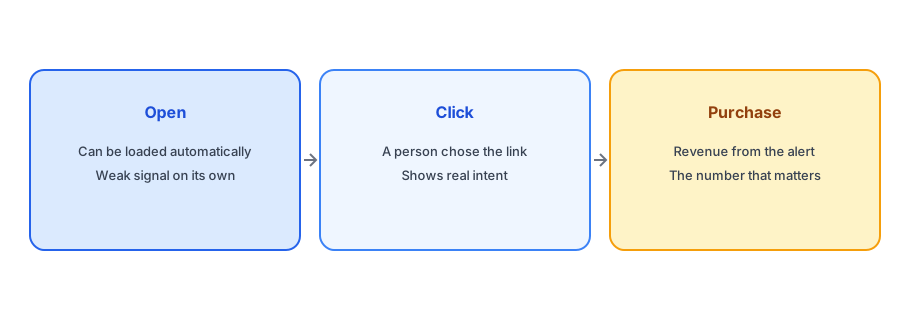
Clicks are a stronger signal because they require a person to act, although some security tools also click links automatically, so treat very fast clicks in large numbers with caution. Better still are the numbers further down: visits to the restocked product page, add-to-cart events, orders and revenue attributed to the alert. Those are what you actually care about. Our guide to measuring revenue from back-in-stock alerts explains how to tag links and read the results.
Pair that with a simple ratio: of the people notified, how many bought? That conversion rate is more useful than any open rate, because it describes outcomes rather than activity. Remember that a small restock with few subscribers will produce a noisy percentage, so look at counts as well.
Measure the alert by what it sells, not by what it opens. Griffin sends a restock email for each subscriber of the variant that returned.
Install Griffin on ShopifyUsing Opens Sensibly When You Have Them
Open data is not useless, just limited. It can still help you spot a sudden collapse, which may point to a deliverability problem. If you see opens drop sharply across all audiences, check your sender setup; our guide to back-in-stock emails going to spam explains SPF and DKIM. Compare opens against yourself over time and against similar emails, not against industry figures, and do not use them to pick winners in subject-line tests, since inflated opens can favor whichever version Apple preloads most. For subject lines, judge by clicks and purchases; our list of back-in-stock subject lines gives you ideas to test.
Setting Up Simple Reporting
You do not need a complicated dashboard. Pick three numbers for each restock: how many subscribers were notified, how many clicked through to the product page, and how many orders came from those clicks. Write them down after each significant restock for a few months. Patterns appear quickly: variants that convert well, products where the link may be broken, and restocks that were too small to matter. Because the numbers come from actions rather than automatic fetches, they hold up regardless of what any email client does with tracking pixels, and they tell you what to do next, which an open rate rarely does.
A Practical Checklist
- Treat open rate as a rough signal, not a measure of readers.
- Judge restock emails by clicks, product page visits, orders and revenue.
- Tag links so purchases can be attributed to the alert.
- Watch for sudden drops in opens as a possible deliverability issue.
- Test subject lines on clicks and purchases, not opens.
FAQ
What is Apple Mail Privacy Protection?
A feature that can preload email content, including tracking pixels, so opens may be recorded even when nobody read the message.
Is open rate useless for restock emails?
Not useless, but unreliable. It can reveal a sudden problem, but it should not be your main measure of success.
Which metrics should I use instead?
Clicks, product page visits, orders and revenue attributed to the alert, plus the share of notified subscribers who bought.
Should I A/B test subject lines using opens?
No. Inflated opens can mislead the result. Compare versions by clicks and purchases.
The Bottom Line
Because opens can be automatic, they say little about whether a restock email worked. Follow the trail to clicks, orders and revenue instead. Griffin is a Shopify back-in-stock app you can install from the Shopify App Store, free to start.