A growing number of competitor apps bundle preorder functionality directly into back-in-stock tools, and Shopify's own App Store keeps backorder apps in a separate category from both. That's created real confusion: merchants search "back in stock vs preorder" trying to figure out if these are the same feature with two names, or genuinely different tools that happen to show up on the same sold-out product page.
They're different, and the difference comes down to one question: does the customer pay before the item is actually in the merchant's hands, or after? Get that mismatched with your product, and you either scare off customers with an unexpected charge or leave money on the table you could have collected upfront.
What's the Difference Between a Preorder App and a Back-in-Stock Alert?
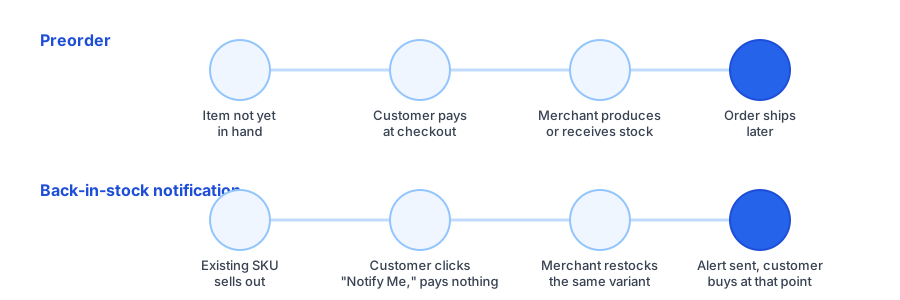
A shopify preorder app lets a customer buy a product before the merchant has stock to fulfill it. The customer pays at checkout, the order sits as pending, and it ships once the merchant produces or receives inventory. The merchant gets cash flow before fulfillment, which is often the entire point of using preorder for a new or made-to-order item.
A back-in-stock alert works the opposite way. Nothing is charged when a customer subscribes to a sold-out variant. The merchant restocks on their own timeline, sends the alert, and the customer completes a normal purchase at that point. No money changes hands until the product actually exists and is ready to ship.
| Situation | Preorder | Back-in-stock alert |
|---|---|---|
| Customer pays | At checkout, before shipping | After restock, at time of purchase |
| Merchant has stock in hand | Not yet | Yes, once restocked |
| Best fit | New or made-to-order products | Existing SKUs on a reorder cycle |
| Funds production | Often, yes | No |
When a Shopify Preorder App Makes Sense
Preorder earns its place when a merchant genuinely needs commitment or capital before production happens. That's a narrower situation than it might seem:
- Made-to-order or small-batch goods, where preorder revenue funds the production run itself.
- New product launches where the merchant wants to gauge real purchase intent, not just interest, before manufacturing at scale.
- Long lead-time imports, where collecting payment upfront offsets the working capital tied up for weeks or months.
In each case, the customer is knowingly trading a shipping delay for the certainty of securing the item, and the merchant is knowingly trading customer patience for cash flow. Both sides need that trade to be clear at checkout, or it turns into a support problem.
When Back-in-Stock Alerts Are the Better Fit
Most Shopify stores aren't launching a new product or funding a production run when a listing sells out. They're managing a routine restock vs preorder decision on a SKU that already exists and already sells. That's exactly when a back-in-stock alert is the right tool:
- The product has a proven sales history and just sold through faster than expected.
- You reorder from the same supplier on a predictable cycle.
- You don't want to collect payment for something you can't yet confirm a ship date for.
- You want variant-level demand data (which size, which color) to prioritize your next reorder.
This is also the safer default from a trust standpoint. Charging a customer's card for an item that isn't in hand yet carries real risk if a shipment is delayed or falls through, something we touched on when comparing back-in-stock notifications to waitlists. A free "Notify Me" subscription carries none of that risk, since nothing is owed until the product is actually ready to sell.
See how a variant-aware "Notify Me" widget looks on your product pages, no payment collected until the customer is ready to buy.
Install Griffin on ShopifyBackorder Alerts: The Middle Ground
Shopify's App Store lists backorder apps as their own category, separate from both preorder and back-in-stock tools, and that's because people searching for backorder alerts usually mean something in between the other two. A backorder typically means the merchant already knows a restock is coming, often on a defined timeline from a supplier, and some stores let customers purchase immediately with a clearly labeled ship date rather than waiting for a full restock.
In practice, the line between "backorder" and "preorder" varies by app and by store; some use the terms interchangeably. What matters more than the label is being explicit with the customer: if they're paying now for something that ships later, say so clearly at checkout, regardless of which term the app uses internally.
FAQ
What's the difference between back in stock and preorder on Shopify?
A back-in-stock alert notifies a customer for free once a sold-out variant is restocked, and they pay when they return to buy it. A preorder charges the customer at checkout for an item that hasn't shipped yet, before the merchant has it in hand.
When should a Shopify store use a preorder app instead of back-in-stock alerts?
Use a preorder app when you need to collect payment before manufacturing or importing stock, such as a made-to-order run or a new product you're funding with early orders. Use back-in-stock alerts when the product already exists and you're just waiting on a routine reorder.
What is a backorder alert and how is it different from a preorder?
A backorder typically means the item is confirmed to be restocking, often on a known timeline, and some stores let customers purchase it immediately while it's in transit. A preorder more often applies before production has started at all. The line between the two varies by app and by store.
Can a Shopify store use both preorder and back-in-stock alerts?
Yes, and many stores do. Preorder fits new or made-to-order products where payment upfront funds production, while back-in-stock alerts fit existing SKUs that sell through and get reordered on a normal cycle.
The Bottom Line
Preorder and back-in-stock alerts solve different problems even though they show up on the same kind of sold-out page. Preorder collects payment to fund production on something that doesn't exist yet. Back-in-stock alerts capture demand on something that already exists and will be restocked on its normal cycle, without asking the customer to pay a cent before it's ready. Most Shopify stores, most of the time, are in the second situation, not the first.
If your store is restocking existing products rather than funding new ones, Griffin adds a free, variant-aware "Notify Me" widget with no payment collected until the customer chooses to buy. Install Griffin on the Shopify App Store to set it up on your next restock.