Merchants end up with waitlists in all sorts of places: a Google Form from a product launch, a spreadsheet of people who emailed asking about a sold-out item, an export from an old back-in-stock app. When they install a new app, the obvious question is how to import the waitlist they already have. The upload is the easy part. The parts that cause trouble are consent, product matching and the limits some apps place on imports. This guide covers what you can reasonably move, how to prepare a CSV, and when starting fresh is the better choice.
Start With Consent, Not the File
A back-in-stock subscriber has asked for one thing: an email when a specific product returns. That narrow request is what makes the email welcome and, in many places, what makes it lawful to send. Before importing anyone, ask whether each person on the list asked for that alert, for that product.
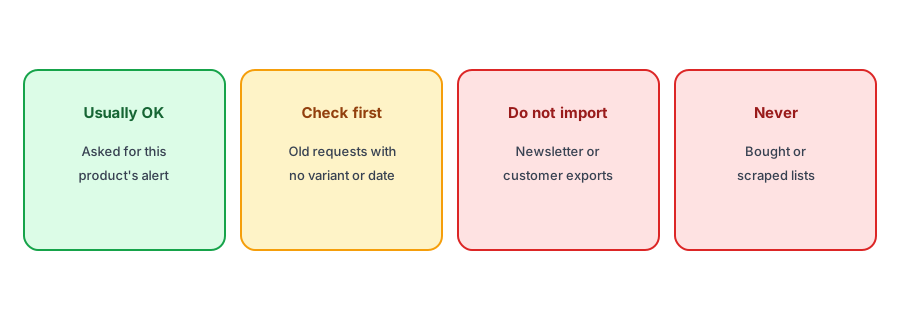
- People who signed up for a restock alert on a product, through an old app or a form, generally asked for exactly this. They are the best candidates to move.
- People who emailed or messaged you asking "tell me when this is back" made a direct request, but you may not have a clear record of it. Keep the message or note the date.
- Newsletter subscribers and customer exports did not ask for a restock alert. Importing them as restock subscribers means emailing people about products they never asked about.
- Purchased or scraped lists should never be imported anywhere.
Consent for imported emails is not a formality. Rules such as GDPR in Europe expect you to be able to show that someone agreed to receive a message. Our guide to GDPR and double opt-in for restock alerts covers the basics. This is general information, not legal advice; if your list is large or the source is unclear, check with someone qualified.
Preparing an Import CSV
Apps that accept imports usually expect one row per subscriber per product. When you prepare import subscribers csv back in stock files, the columns that matter are:
- Email address, cleaned of obvious typos and duplicates.
- The exact variant, ideally by variant ID or SKU rather than product name. A request for "the blue jacket" is useless if you sell it in five sizes. Our post on variant-level alerts explains why the variant matters.
- Signup date, so you can drop requests that are too old to honor.
- Consent source, such as "old app" or "contact form", kept in your own records even if the app does not store it.
Drop rows that point at discontinued products, deleted variants or products you will not restock. Those people should get a short, honest note instead, as covered in our guide to subscribers for discontinued products.
Import Limits and What They Mean
Some apps cap how many subscribers you can import, or only allow imports on paid plans. A back in stock subscriber import limit is not necessarily a sign of a bad app. Large imports of unconfirmed addresses are a common way to damage sending reputation, and every restock email sent to an imported address counts against your monthly notification allowance like any other. Before you move a waitlist to a new app, check the app's documentation for import support, plan limits, and whether imported subscribers are asked to confirm their address.
Griffin does not currently import subscriber lists. Signups come through its Notify Me widget on your product pages, tied to the variant the shopper chose and confirmed with double opt-in. If you are switching from another app, the approach in the next section is how we suggest moving people over.
Griffin collects variant-level signups with double opt-in from the moment you install it, so your new list starts clean. Free to start.
Install Griffin on ShopifyThe Clean Alternative: Ask People to Re-Subscribe
If an import is not possible, or the list's consent is unclear, ask the people on it to sign up again. It sounds like a loss, but it often produces a better list:
- Install the new app and check the button on your sold-out products first, so the signup path works before anyone arrives.
- Send one email from the old tool to the people who asked for restock alerts, saying you have changed how alerts work and linking straight to each product page so they can tap Notify Me again.
- Keep it to one message. Do not turn it into a series of reminders.
- Leave the old app running briefly if it can still send alerts for products that restock during the changeover, then remove it cleanly. Our guides to switching apps and uninstalling one cover the details.
The people who re-subscribe have just told you, again, that they want the product. They are confirmed, attached to the right variant and recent, which is exactly what you want on a restock list.
A Quick Checklist
- Only move people who asked for a restock alert on a specific product.
- Match each row to a variant, not just a product name.
- Drop very old requests and products you will not restock.
- Check the app's import support, limits and confirmation step.
- If in doubt, invite people to re-subscribe instead.
FAQ
Can I import my newsletter list as restock subscribers?
You should not. Newsletter subscribers did not ask for alerts about specific products, so emailing them as restock subscribers ignores what they agreed to.
What columns does a waitlist import need?
At least the email address and the exact variant, ideally by variant ID or SKU. A signup date and a record of where consent came from are also useful.
Does Griffin import subscriber lists?
Not currently. Griffin collects signups through its Notify Me widget with double opt-in, so the usual route when switching is to invite old subscribers to sign up again.
Why do some apps limit imports?
Large imports of unconfirmed addresses can harm sending reputation, and imported subscribers use notification allowance like any other.
The Bottom Line
A waitlist is only worth moving if the people on it asked for the alert. Move those carefully, or invite them to sign up again. Griffin builds a clean, confirmed restock list from day one, and you can install it free from the Shopify App Store.