A back-in-stock waitlist looks like an asset, and it is. But requests have a shelf life. Someone who asked to be told about a jacket in spring may have bought a different one in summer, lost interest, changed their email address or forgotten they asked. Sending that person an email months later is not always harmful, but it is less welcome and less likely to convert. How you handle old back-in-stock requests is a question of relevance and deliverability, not just tidiness. We could not find reliable published data on how request age affects conversion, so this post offers principles and options rather than numbers.
Why Age Matters
Three things change as a request ages. Relevance fades, because the need that prompted the request may be gone. Context fades, because the person may not remember asking, which makes the email look like unsolicited mail. And the address itself may decay, because people abandon mailboxes and change providers. A restock email that reaches someone who no longer remembers the request is more likely to be ignored or marked as spam, which can hurt your sender reputation. Our post on back-in-stock emails going to spam explains why complaints matter.
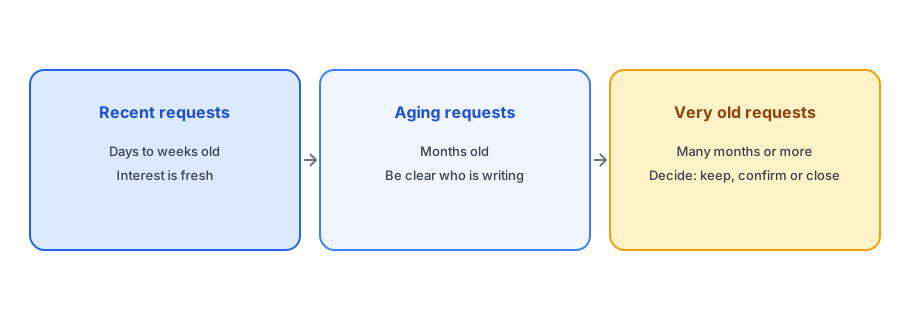
Recent Requests: Send Without Hesitation
If the request is days or weeks old, the shopper remembers, and the product is still wanted. These are your best prospects. Send the alert promptly with the product name, the variant and a clear link, and keep the message short.
Aging Requests: Give Context
For requests that are months old, a small amount of context helps. State that the recipient asked to be notified about this specific item, name it, and say when. A line such as "You asked us to email you when this was back in stock" reminds the recipient why they are hearing from you and reduces the chance of a spam complaint. Make the unsubscribe option obvious. Our back-in-stock email copy and design guide covers the details.
Very Old Requests: Make a Decision
At some point, a request is old enough that you should choose what to do with it. The options are to keep sending as normal, to send a one-time confirmation asking whether the person still wants the alert, or to close the request. The right choice depends on your product. For durable goods that return rarely, a long wait may be normal and a request a year old may still be valid. For fast-moving or seasonal items, an old request may be meaningless. Check what your app does by default and whether it lets you set a limit; do not assume it expires requests automatically, and do not assume it does not.
Collect requests that are clearly tied to a product and variant. Griffin is free to start.
Install Griffin on ShopifyWhen the Product Is Not Coming Back
The most important cleanup is tied to the product, not the date. If an item is discontinued, every request for it is stale by definition, and leaving people waiting is the worst outcome. Tell them, point them to an alternative if there is one and close the requests. Our guide to handling subscribers when a product is discontinued covers this. A similar situation arises when you delete a variant, which can orphan requests; see our post on deleting variants without losing your waitlists.
Deliverability and Respect
Keeping a list tidy is partly about respect for the people on it. Honor unsubscribes immediately, do not re-add people who have opted out and keep the sender identity consistent. Good hygiene supports deliverability, which supports every future alert. If your list includes people in regions with strict consent rules, our guide to double opt-in and GDPR basics explains what to consider.
A Simple Review Routine
Once a quarter, look at your open requests grouped by product. You are looking for three things: products that have been sold out for a long time with growing lists, products you have decided not to restock and requests that are old enough to need a policy decision. For the first group, consider whether a restock is realistic; a list that grows without an answer is a signal to either reorder or communicate. For the second, close the requests and tell people. For the third, apply your chosen rule. Fifteen minutes each quarter is enough.
A Practical Checklist
- Send recent requests promptly and without ceremony.
- Add a reminder of the original request when sending to older subscribers.
- Decide on a policy for very old requests: keep, confirm or close.
- Close requests for discontinued products and tell the subscribers.
- Check what your app does with old requests rather than assuming.
- Honor unsubscribes immediately.
FAQ
Do Notify Me requests expire?
That depends on your app and settings. Check how your app handles old requests and whether it lets you set a limit.
Is it bad to email someone about a very old request?
It can be less welcome and may prompt complaints. Include a reminder of the original request and make unsubscribing easy.
What should I do with requests for discontinued products?
Tell the subscribers the product is not returning, suggest an alternative if there is one and close the requests.
Why does list hygiene affect deliverability?
Spam complaints and unengaged addresses can hurt your sender reputation, which affects whether future alerts reach the inbox.
The Bottom Line
Treat old requests with care: send recent ones promptly, give aging ones context and decide deliberately about the oldest. Griffin is a Shopify back-in-stock app you can install from the Shopify App Store, free to start.