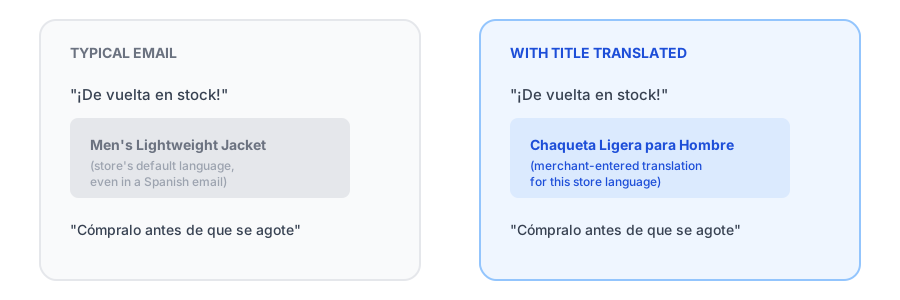
Run a multi-language Shopify store and your back-in-stock alerts usually look mostly right at first glance: the subject line, the body copy, even the button text show up in the shopper's language. Then you look closer at the actual product being restocked, and the title is sitting there in whatever language it was originally entered in the admin, regardless of which language the rest of the email is in. It's a small-looking bug with an outsized effect, since the product name is the one piece of information the email actually exists to deliver.
Why Apps Translate the Template but Not the Title
This isn't a bug so much as a gap in how most apps are built. The email template, the subject line, the "it's back!" headline, the button copy, lives in the app's own localization files, built once per supported language. The product title is a different kind of data entirely: it comes straight from Shopify's product object, in whichever single language it was entered. Unless an app does extra work to look up or store a translated version of that specific title, there's nothing to translate it with. The template switches languages. The title doesn't, because as far as the underlying data goes, there's only ever been one version of it.
Why a Mistranslated Title Undermines the Whole Email
Localizing a store in the first place is usually a deliberate decision: it signals to a shopper that this is a store built for them, in their language, not a foreign site they happened to land on. A restock email that gets that right everywhere except the actual product name breaks that signal at the exact moment it matters most. A subscriber scanning their inbox in their own language, who then hits a product title in a language they don't read fluently, has to pause and work out whether this is really the item they signed up for. That extra friction is a quiet tax on exactly the kind of high-intent click a restock email is supposed to make effortless.
It also undercuts trust in a subtler way. A storefront that's fully localized but sends a notification with a half-translated title can read as sloppy or automated, even though the cause is a technical gap most shoppers never think about. Closing it isn't just a translation nicety, it's part of making the restock email feel like it actually came from the store the shopper subscribed to.
How Griffin Closes the Gap: Merchant-Entered Titles, Per Language
Griffin now supports shopify back in stock alert translation at the product level, not just the template level. Merchants can enter a translated product title for each language the store already has configured, so a restock email actually displays the product name the subscriber expects to read, not a title in a language they may not speak at all.
This works through manual entry rather than automatic machine translation. The merchant who knows the product, and knows the market, types in the title they want shown for each store language. For a well-known product, a brand name, or a style name that shouldn't be translated at all, that control matters: automatic translation tools have no way of knowing which words are proper nouns and which aren't, and getting a product name wrong in print looks worse than leaving it in the original language. Manual entry means you decide the exact wording your customers see, language by language.
See how per-language product titles look in a restock email on your own store.
Install Griffin on ShopifyWhat This Feature Doesn't Do
It's worth being precise about the scope here, since back in stock notification multiple languages support can mean different things depending on the app. This feature doesn't add new languages to your storefront or your Shopify setup, and it doesn't automatically translate anything. It works within the languages your store already has configured, whether that's through Shopify Markets or your theme's language settings, and simply gives you a place to supply the restock email title for each of those existing languages. If you haven't added a translation for a given product and language, the email falls back to the default title, exactly as it did before.
FAQ
Why does the product title stay in the wrong language in a translated restock email?
The surrounding email template is localized separately from product data. Unless an app does extra work to pull or store a translated title, it reads the product title straight from Shopify in whatever language it was originally entered, regardless of the email's language.
Does Griffin automatically translate product titles?
No. Griffin lets merchants manually enter a translated product title for each of the store's configured languages, rather than relying on automatic machine translation.
Which languages can I add a translated title for?
Any language already configured for your store. This feature doesn't add new languages to your storefront, it lets you supply a restock email title for the languages you've already set up.
What happens if I don't add a translation for a language?
The email falls back to the product's default title, the same behavior as before this feature existed. Adding translations is optional per product and per language.
The Bottom Line
A restock email that's translated everywhere except the one thing it's actually about undercuts the entire point of localizing it. Closing that gap doesn't require automatic translation or a Shopify Markets integration, just a place for the merchant to enter the title they want shown, in each language their store already supports, with a sensible fallback when they haven't gotten to it yet.
If you haven't added the Notify Me widget to your store yet, our guide on adding a back-in-stock Notify Me button covers that first step. If you're running a multi-language store, see how Griffin handles per-language product titles on your own restock emails. Install Griffin on the Shopify App Store to set it up, free to start.