A creator posts a short video using one of your products. By the next morning the product is sold out, your inbox is full of questions, and nothing in your plan covered this. The sell-out and restock cycle of a viral product is different from a planned drop or a collectible with built-in scarcity: the trigger is unplanned and external, and the window to respond is short. What you do in the first couple of days decides whether that attention turns into customers or just a spike on a chart.
Why a Viral Stockout Is Its Own Problem
Brands in beauty and consumer goods have seen social platforms drive sellouts and restock rushes, and the pattern is familiar: attention arrives faster than supply can respond. Unlike a streetwear drop, where you chose the quantity and the date, a viral moment hands you demand you never forecast. That is why the usual restock playbook does not quite fit. You are not managing a known list of loyal fans, you are managing a crowd that found you minutes ago. If you sell limited-run items, our post on streetwear drops covers the planned version of this.
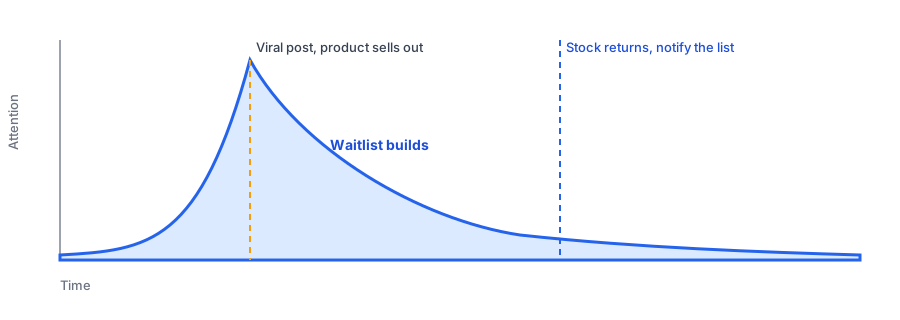
Details like exact spike sizes and how long a viral cycle lasts vary widely and are rarely published reliably, so plan around the shape of the pattern, not a precise number: a sharp burst, a quick fade, and a window in which people are still paying attention.
Keep the Page Live and Capture the Demand
The instinct when something sells out is to unpublish it. Resist that. The shoppers arriving from a viral post are already on your product page or about to be, and a sold-out page with no way to stay in touch sends them straight back to the feed. Leave the page up and offer a way to be notified. Every person who signs up is a name on a list you would otherwise never have had, which is the same idea behind our guide to tracking customer demand on out-of-stock products.
A back in stock alerts social media virality moment also exposes a practical limit: a sudden flood of signups and later a flood of alerts. If you are on a plan with sending limits, check them early; our post on preparing for high-volume weeks explains what to look for.
It also helps to answer the crowd where it formed. If the attention came from a social post, a short reply or pinned comment saying the product is sold out and pointing to the notify me option keeps people from guessing. Shoppers who find a clear next step are far more likely to stay engaged than those who hit a dead end and leave a frustrated comment instead.
Capture the demand while the attention lasts. Griffin adds a Notify Me option to sold-out products.
Install Griffin on ShopifyUse the Waitlist to Decide What to Reorder
After a spike, the hardest question is how much to make or buy. The waitlist is the cleanest answer you have, because it counts people who asked for this exact product. It is still an upper bound. Viral attention is broad and shallow, so a lower share of those signups will convert than on a list of loyal customers. Use it to size a first reorder, not to justify a huge one, and watch how the list grows over the first days to see whether interest is still rising or already fading. This is the core of any plan for restocking after a demand spike.
When Stock Returns, Move Fast and Be Clear
Viral interest has a short shelf life, so the gap between the moment and the restock matters more than usual. When inventory is back, notify the list promptly and say plainly what is available. If the restock is smaller than the list, which is common, set expectations in the message so people are not surprised, and see our guide to limited restocks and waitlists for how to handle it. Griffin sends the alert when your inventory returns; it does not forecast demand or reorder stock for you.
FAQ
Should I turn off the product page when a viral item sells out?
Usually no. Keep the page live so the traffic has somewhere to land, and add a notify me option so interested shoppers can be told when stock returns. Hiding the page throws away the attention you just earned.
How do I know how much to reorder after a viral spike?
Your waitlist is the best signal you have. The number of people asking to be notified is real, product-specific demand, though viral interest fades, so treat it as an upper bound and not a forecast.
Will everyone on the list buy when the product returns?
No. Viral attention is broad and shallow, so expect a lower conversion rate than a loyal repeat-customer list. Plan inventory around that, and avoid over-ordering on the assumption that every signup will convert.
Can a restock alert go out too late to matter?
Yes. Viral interest has a short shelf life, so a restock weeks after the moment may reach shoppers who have moved on. Faster replenishment and a clear message about what is coming help most.
The Bottom Line
You cannot schedule a viral moment, but you can be ready for one. Keep the sold-out page live, capture everyone who wants to be told, use the list to size your reorder with some caution, and notify quickly when stock returns. Griffin handles the notification side, and you can install it from the Shopify App Store, free to start.