Most stockouts do not arrive without warning. The numbers move for weeks, and nobody is looking. A short weekly review fixes that. This routine covers seven inventory KPIs for ecommerce, each tied to an action, and each sized so the whole thing takes about 20 minutes. Work down the checklist below, mark each number as fine or needing action, and copy the result as a to-do list for the week. Nothing you enter leaves your browser.
The Weekly Inventory Check
Why These Seven
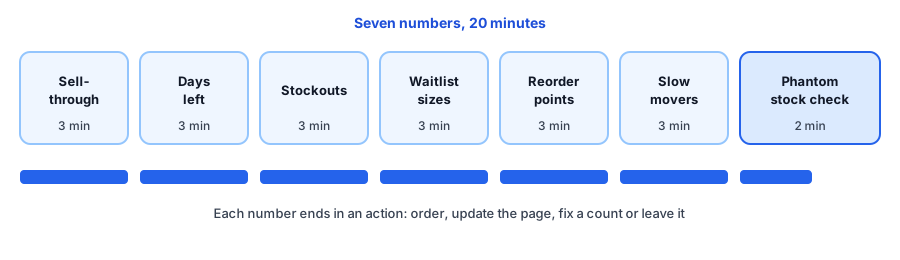
Each number answers a different question. Sell-through and days left tell you how fast stock is moving and how long it will last. Stockouts and waitlist sizes show what you are already missing and how many people noticed. Reorder points tell you what to order today, slow movers show where cash is stuck, and the phantom stock check protects the accuracy of everything else, because every number above is only as good as your counts.
Notice what is missing: vanity totals. Total units on hand or total inventory value can look healthy while your best seller is a week from empty. These seven are about decisions, so each ends with an action, not just a number.
Where to Find the Numbers
Shopify's help documentation describes inventory metrics such as sell-through rate, days of inventory remaining and an ABC analysis report in its product analytics. Sources differ on the period each report looks at, so confirm the window and where each report sits in your admin before you rely on it. For anything the reports do not cover, such as reorder points and the stockout rate, a simple saved spreadsheet works.
For the stockout rate, divide your out-of-stock active variants by your active variants and multiply by 100. The checklist above does this for you. Track it on the same day each week, because the trend matters more than any single reading.
Keeping It to 20 Minutes
- Review your best sellers and anything you are advertising, not the whole catalogue.
- Bookmark each report once, so you are not hunting for it every Monday.
- Decide at the check, not later: order, update the page or leave it, and write the choice in the note.
- Do it on the same day each week. Monday suits many stores because you plan the week's orders, but any consistent day works.
Where Griffin Fits
Griffin, a Shopify back-in-stock app, adds a Notify Me popup or inline form to sold-out products. Shoppers sign up for the variant they want, and Griffin emails them when it is back. Because signups are recorded per product and variant, they give you the waitlist sizes in step four. Griffin's revenue report shows recovered revenue net of refunds, which helps you judge what a restock was worth. The free plan includes 100 notifications a month. Griffin does not calculate sell-through, days left or reorder points, and it does not send you low-stock alerts, so use the low-stock alert planner to set your own warning. If a spot check finds counts that do not match, our guide to inventory counts and alerts that disagree explains what to look at.
Waitlist sizes are one of the seven numbers. Griffin records them per product and variant as shoppers sign up for restock alerts.
Install Griffin on ShopifyWhen a Number Needs Action
Treat the check as the start of a loop. When a number needs action, do the one thing that fixes it this week. If a product sold out despite the routine, write it up with the stockout postmortem template and estimate the cost with the lost-sales calculator. Over a few weeks, the notes show which numbers keep going wrong, and that is where to improve your process.
FAQ
What inventory KPIs should an ecommerce store track every week?
A small set is easier to keep up: sell-through, days of inventory left, stockouts, waitlist sizes, reorder points reached, slow movers and a quick check that your counts match reality. The seven in this routine each lead to a specific action.
How do I calculate stockout rate?
Divide the number of active variants that are out of stock by the number of active variants you sell, then multiply by 100. Track it on the same day each week so the trend means something. You can also measure it in days out of stock for your best sellers.
How long should a weekly inventory review take?
About 20 minutes once you have the reports bookmarked. If it takes much longer, check fewer products: start with your best sellers and the ones you advertise.
Does Griffin track these inventory KPIs?
No. Griffin captures restock signups on sold-out products and variants and emails those shoppers when the item is back, so it gives you waitlist sizes. It does not calculate sell-through, days left or reorder points, and it does not send you low-stock alerts.
The Bottom Line
A weekly inventory check works because it is short, regular and ends in decisions. Run the seven numbers, write down what needs action and do it before the next Monday. Griffin is a Shopify back-in-stock app you can install from the Shopify App Store, free to start.