Most stockouts are not surprises. They happen because an order was placed too late, and nobody knew how late was too late. A reorder point fixes that with a single number per product: when your stock falls to it, you reorder, and the new units arrive before you run out. It is the upstream cure for the problem restock alerts treat downstream. This guide gives you the formula in plain English and a calculator you can use in about five minutes. Every default in it is an example to replace with your own.
The Formula in One Line
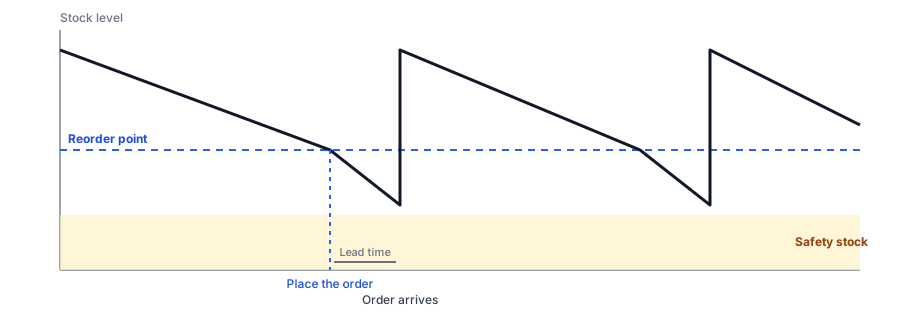
Reorder point = demand during your lead time + safety stock. Demand during lead time is how many units you sell per day, times how many days it takes a new order to arrive. Safety stock is the cushion that covers a bad week: it is the gap between your worst case and your typical case. A simple, conservative way to size it is your highest daily sales times your longest lead time, minus your average daily sales times your average lead time.
The Calculator
Where to Find Your Numbers
- Average and highest daily sales: your Shopify sales reports or an export of recent orders, by product or variant. Shopify also offers inventory reports on some plans, so check what yours includes.
- Lead time: look at the dates you placed and received your last few orders from each supplier, not the number the supplier quotes.
- Worst case: use the longest delay you have actually seen, since it is the one that will happen again.
Do this per product, or at least for your best sellers. A single store-wide number will be wrong for almost everything.
Cover the gap while you reorder. Griffin adds Notify Me to sold-out products so demand is captured, not lost.
Install Griffin on ShopifyUsing Your Waitlist as Extra Demand Data
A reorder point is built from sales you made. It misses sales you could not make because the product was sold out. Your restock-alert waitlist records exactly that: people who wanted the item when you had none. Griffin's dashboard shows which products are in demand, and the waitlist size tells you how much of your next order to add above the formula. Treat it as an upper bound, since not everyone on a list will buy; our lost-sales calculator shows how to estimate the winnable share, and tracking demand on out-of-stock products explains how to read the list. Griffin does not forecast or place orders for you; it gives you the signal.
A Worked Example
Suppose a product sells 10 units on an average day and 14 on its busiest. Your supplier usually delivers in 14 days but once took 18. Demand during an average lead time is 10 x 14 = 140 units. Your worst case is 14 x 18 = 252 units. The difference, 112 units, is your safety stock, and the reorder point is 140 + 112 = 252. When stock falls to 252, place the order. If everything goes normally, the order lands with about 112 units still on the shelf. If sales spike and the shipment is late, those 112 units absorb it. This method is deliberately cautious, because it assumes the worst demand and the worst delay happen together. If holding that much stock ties up too much cash, you can accept a little more risk by using a smaller cushion, but make that a choice and not an accident.
Turning the Number Into a Habit
A reorder point only helps if someone looks at it. Write the number next to each product in a simple sheet, check stock against it weekly, and set a reminder to recalculate before each busy season. If you use Shopify Flow, you can also alert your team when a variant's inventory drops, which we cover in our post on notifying your own team about restocks. The aim is to make reordering routine, so the sold-out page becomes the exception.
Common Mistakes
- Using the supplier's quoted lead time instead of your real one.
- Calculating once and never updating. Redo it before busy seasons; see preparing for Black Friday and Cyber Monday and holiday stockouts.
- Ignoring variants. A product with five sizes has five reorder points, and the middle sizes usually go first; see apparel size runs.
- Counting phantom stock. A refund that restocks an item you do not have makes your count look healthier than it is; see false back-in-stock alerts.
FAQ
What is a reorder point?
It is the stock level at which you should place a new order so it arrives before you run out. It equals the demand during your supplier's lead time plus a safety buffer.
What is safety stock?
Extra units you hold to cover surprises: a sales spike, a late shipment or both. It is the difference between your worst case and your average case.
How often should I recalculate?
Whenever demand or lead time changes noticeably, and at least before each busy season. Reorder points that were right in spring can be wrong by the holidays.
Does a restock alert replace a reorder point?
No. An alert captures demand after a product sells out; a reorder point is meant to stop it selling out in the first place. They work best together, and the alert list shows how much demand you missed.
The Bottom Line
A reorder point turns "I think we are low" into a number you can act on. Calculate it per product from your real sales and lead times, add safety stock for the bad weeks, and use your waitlist to see the demand you missed. Griffin is a Shopify back-in-stock app you can install from the Shopify App Store, free to start.