Merchants ask the same questions about back-in-stock notifications again and again, usually in plain words: do I need one, how does it work, what does it cost, why did my customer not get an email. This page collects thirty of them with short answers. It is meant to be read quickly, and each answer links to a longer guide where there is one. Where we describe Griffin, we use only what is published about it, and we tell you to check the App Store listing and privacy policy for current details. Pricing and features change, so treat any figure as correct at the time of writing.
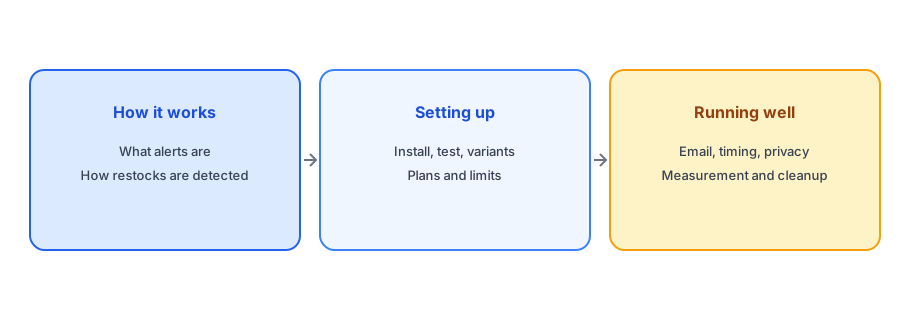
How Back-in-Stock Alerts Work
What is a back-in-stock notification?
An email that tells a shopper a sold-out product is available again. The shopper asks for it by entering their email on the sold-out product page.
Does Shopify have a built-in back-in-stock notification?
Not a fully automatic one. Most stores use an app that adds a Notify Me form to sold-out pages and emails subscribers when stock returns.
Do I need a back-in-stock app?
If you have products that sell out and later return, an app lets you capture interest instead of losing the visitor. If nothing you sell ever returns, you may not need one.
How does a back-in-stock app know when a product is restocked?
It watches the inventory quantity Shopify holds for each variant. When a variant that was at zero becomes available, subscribers to that variant are notified.
Does the product need quantity tracking turned on?
Yes. If Track quantity is off for a variant, its count never changes, so a restock cannot be detected.
Can shoppers sign up for a specific size or color?
Yes in a variant-aware app. Griffin ties each signup to the variant the shopper chose and notifies only that variant's subscribers.
Where does the Notify Me button appear?
On sold-out product pages. With Griffin it appears automatically without editing theme code and works with Shopify 2.0 themes.
Do I have to edit my theme code?
Not for Griffin. It is added without theme code editing. Customized themes can still need checking, so test on your own store.
Is a back-in-stock alert the same as a waitlist?
Close but not identical. An alert notifies people when stock returns, while a waitlist may also manage order of access for limited units.
What is double opt-in?
A second step where the shopper confirms their email address before being subscribed. Griffin supports double opt-in.
Setting Up and Choosing
Does Griffin send SMS or push notifications?
No. Griffin is email-only in its current version.
Is an email-only app enough?
For many small stores, yes, since the shopper has already given an email address. SMS adds cost and consent requirements.
How much does Griffin cost?
Free is $0 per month with 100 notifications. Basic is $9 per month with 1,000 notifications. Pro is $29 per month with 10,000 notifications. Check the App Store listing for current pricing.
Are signups limited on the free plan?
Griffin's free plan lists unlimited signups, with 100 notifications sent per month.
What counts as a notification?
One restock email sent to one subscriber. A restock that notifies 50 people uses 50 notifications.
What happens if I reach my monthly notification limit?
Sends can be limited until the period renews or you change plan. Check your usage in the app and plan limits before a big restock.
How fast is the alert sent?
It follows your Shopify inventory count. If the count updates late, for example from a warehouse sync, the alert is late too.
Why did a subscriber not get an email?
Common causes are the wrong variant restocked, a late inventory update, a plan limit or the email landing in spam or promotions.
Can I send the alert before stock is ready?
You should not. An alert should follow a true, sellable Shopify quantity, or shoppers click and find it unavailable.
What if I have more subscribers than stock?
Tell subscribers quantities are limited and decide in advance how you will handle a rush, such as a staged release.
Running Alerts Well
Should I hide sold-out products?
Usually not if they will return. A live page with a Notify Me option keeps traffic and captures demand.
Does a Notify Me button affect SEO?
It does not change your structured data. The availability value should still say out of stock while the product is sold out.
What should the restock email contain?
The product and variant, a direct link, a line about quantities if limited and your return terms. Keep it short.
Should I put a discount in a restock email?
Usually not for popular items. A shopper who asked for the product already wants it, and a code can give away margin.
Which metrics matter for restock emails?
Clicks, product page visits, orders and revenue. Opens are unreliable because of mail privacy features.
How do I calculate my Notify Me signup rate?
Divide signups by sessions on sold-out product pages over the same period, and compare against your own baseline.
Can I see which products people want?
Yes. Signup counts per product and variant show demand and can guide reordering. Griffin's dashboard shows demand insights per product.
Is subscriber data shared or sold?
Griffin states it does not sell or share personal data with third parties for commercial purposes. Read its privacy policy for details.
How do customers unsubscribe?
Through the unsubscribe option in the email. Honor requests immediately and do not re-add anyone who has opted out.
What if a product is discontinued?
Tell subscribers it is not returning, suggest an alternative if there is one and close their requests.
How do I start?
Install the app from the Shopify App Store, enable it for your theme and test a signup on a sold-out product before going live.
Ready to try it? Griffin is free to start and adds Notify Me to sold-out products without theme code.
Install Griffin on ShopifyWhere to Go Next
If you are new to the topic, start with our complete guide to back-in-stock notifications. If you are choosing an app, read how to evaluate a back-in-stock app before you install it and our pricing guide. If something is not working, our guide to why alerts fire late is the best first stop, and our ten-minute test plan helps you check your setup.
The Bottom Line
Most of the questions have short answers, and most problems come down to inventory counts, variants and settings. Griffin is a Shopify back-in-stock app you can install from the Shopify App Store, free to start.