Almost every back-in-stock app looks the same on its listing: a Notify Me button, automatic emails, a free plan. The differences that matter show up later, the first time a restock is detected late, an email goes out twice, or a customer asks where their data went. Choosing well is less about comparing feature lists and more about finding out how an app behaves under real conditions before you rely on it. If you want to choose a back-in-stock app you will not regret, this checklist is built to be run in a single afternoon.
Step One: Read Before You Install
A few minutes on the listing and the vendor's help pages tells you a lot.
- Pricing and limits. Check what a free plan caps, whether the cap counts alerts or subscribers, and what the next tier costs. Our pricing guide explains what is reasonable.
- Permissions. Look at what the app asks to access and ask whether each one makes sense. In particular, find out whether it writes to your customer list; see our post on apps that create customer accounts.
- Reviews, read for patterns. Skip the star average and look at what unhappy reviewers describe: restocks that were never detected, emails about products that were not actually back, duplicates, or support that does not answer. One complaint is noise; the same complaint ten times is a pattern.
- Support. Note how the vendor replies to negative reviews and whether help articles are specific or generic.
- Data and consent. Look for a clear statement of where subscriber data is stored, how deletion works, and whether double opt-in is available. Our post on double opt-in and GDPR basics covers what to look for.
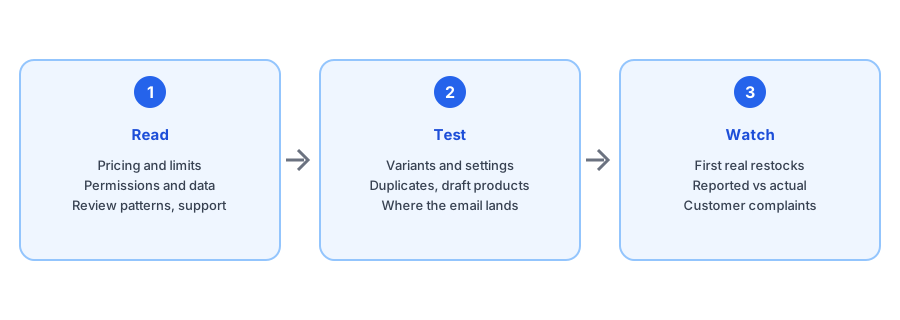
Step Two: The One-Afternoon Test
Install on your live store or a development store and run these checks with a spare email address.
- Does the Notify Me button appear on a sold-out variant, and does it update when you switch sizes or colors? If not, see our post on the button disappearing on a variant switch.
- Does it behave sensibly with your inventory settings, including continue selling? Our guide to that setting explains the trap.
- Sign up, then restock the variant. How long until the email arrives, and does it name the right size and link to it?
- Restock a different variant of the same product. A correct app does not notify your test subscriber.
- Restock again. Do you get a duplicate? See why duplicates happen.
- Set a test product to draft and change its stock. Does an alert go out? See our post on draft products.
- Check where the email lands in Gmail and Outlook, and read the sender name; see the deliverability basics.
- Try unsubscribing from the email and confirm it works.
Run this checklist on Griffin. It has a free plan, so the whole test costs nothing.
Install Griffin on ShopifyStep Three: Questions That Match Your Store
Generic tests will not catch everything that applies to your setup. Add the ones that do.
- Several locations or a retail shop: ask how stock is counted. Our posts on multiple locations and POS inventory explain the pitfalls.
- Selling in several markets or languages: ask how currency and market-specific stock are handled; see Shopify Markets.
- Bundles, preorders or backorders: ask how each is treated.
- Expected volume: ask what happens at your sending limit during a busy week.
Step Four: Watch the First Real Restocks
The best test is real inventory. After the first restock or two, compare what the app reported with what actually happened. Did subscribers hear promptly? Did anyone report a wrong or repeated email? Does the revenue or demand reporting match your own numbers? Our guide to measuring revenue from restock alerts shows how to sanity-check it. If the alerts ever look wrong because of your inventory, not the app, our post on false back-in-stock alerts will help you tell the difference.
Red Flags That Should Stop You
- The vendor cannot explain how a restock is detected or what counts as one.
- Permissions that do not match the features on offer.
- No clear answer on where data is stored or how it is deleted.
- Support replies that avoid your question or take days.
- A pattern of complaints about missed or wrongly sent alerts that the vendor never addresses.
If you do decide to move on from an app later, our guide to switching back-in-stock apps covers what transfers. And if something breaks mid-flight, our troubleshooting guide is the first place to look.
FAQ
How long should I test a back-in-stock app before committing?
Run the full test in the first afternoon, then watch a real restock or two before relying on it. Most serious problems, such as missed restocks, duplicate emails or wrong-variant alerts, show up the first time stock actually changes.
Should I pick the app with the most reviews?
Review volume helps, but read what the complaints are about, not just the star rating. Patterns such as restocks not detected, emails about products that are not back, duplicates and slow support tell you more than the average.
Is a free plan enough to evaluate an app?
Usually yes. A free tier is a good way to run the test with real products. Check what the limits are first, because a cap on monthly emails can matter once you have a real waitlist.
What is the biggest red flag?
An app that cannot clearly explain how it decides a product is back in stock, which permissions it needs, or where subscriber data is stored. Vague answers on basics usually mean trouble later.
The Bottom Line
Choose a restock app the way you would choose any system your customers depend on: read the fine print, test the failure cases, and watch it in real use. The afternoon this takes is cheaper than discovering a problem in front of your subscribers. Griffin is a Shopify back-in-stock app you can install from the Shopify App Store, free to start, and the same checklist applies to it.