Every Notify Me signup is a small piece of information. Someone has told you which product they want, which variant and that they are willing to hear from you about it. It is tempting to treat the growing list as a marketing audience, and some merchants ask how to tag or segment these subscribers for campaigns. The honest answer to questions about segmenting back-in-stock subscribers starts with consent: a person who asked for a restock email did not necessarily ask for your newsletter. This post separates what you can safely do with the data from what needs extra permission. It is general guidance rather than legal advice, and rules vary by region.
What the Signup Actually Consented To
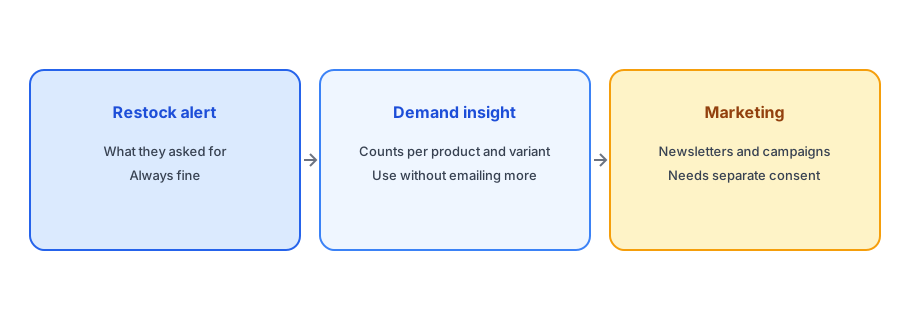
A shopper who enters an email on a sold-out product page is asking for a specific notification about a specific item. That is the scope. Using the same address for broader marketing without a separate opt-in goes beyond what they agreed to, and in many places the law treats it as such. It can also backfire practically: people who receive unrelated promotions after a restock request tend to mark them as spam, which harms deliverability for the alerts they did want. Our post on double opt-in and GDPR basics covers consent in more detail.
Segmenting by Signal, Not by Address
You can learn a lot from signups without emailing anyone extra. Count requests per product, per variant and over time, and you have a demand signal: which items are wanted, which sizes run out first, which colors never get restocked quickly enough. Group by collection or category to see which parts of the catalog lose the most interest while sold out. That is segmentation of your catalog, not of people, and it needs no extra permission. Our guide to tracking customer demand for out-of-stock products shows how to read it, and our post on calculating your Notify Me signup rate shows how to measure the other side.
Following Up on Purchases
Once a subscriber has bought after a restock, they are a customer, and ordinary customer communication applies: an order confirmation, shipping updates and, where your policies and their consent allow, a relevant follow-up. If you want to learn how restock buyers behave, compare them to other buyers using your order data, such as repeat purchases. Our guide to measuring revenue from back-in-stock alerts explains how to attribute orders to alerts.
Collect clear, product-specific requests. Griffin sends the restock alert subscribers asked for and is free to start.
Install Griffin on ShopifyAsking for More, Openly
If you would like restock subscribers to join a broader list, ask. Offer a clear, optional opt-in with its own wording, for example in the restock email itself or at checkout, describing what you will send and how often. Do not pre-tick boxes or bundle the request with the alert signup. Shoppers who say yes are far better prospects than ones who were added silently, and you stay on the right side of the rules. Our guide to collecting emails from out-of-stock shoppers covers the same balance.
Using Klaviyo or Another Email Platform
If you use a marketing platform, be careful about syncing alert subscribers into your general lists. Keep restock signups in their own segment, and only merge people who have given broader consent. Our comparison of Klaviyo back-in-stock alerts versus a dedicated Shopify app explains how the two approaches handle subscribers differently. Whatever tool you use, check how its consent fields work before importing anyone.
What Not to Do
A few tempting shortcuts are worth ruling out. Do not export the signup list and upload it to an advertising platform as a custom audience without consent that covers it. Do not sell, rent or share it. Do not send a weekly newsletter to people who only asked about one jacket. And do not treat unsubscribes as optional: a shopper who leaves your restock list should be removed from it immediately, with no further messages. Each of these may breach the terms of the app, the law or both, and each also erodes the trust that makes restock alerts work. The safest default is simple: use the data for the purpose it was given, and ask again for anything more.
A Practical Checklist
- Treat a Notify Me signup as consent for the restock alert only.
- Segment your catalog by demand using signup counts, not your subscribers by address.
- Ask for broader marketing consent separately and openly.
- Keep restock subscribers in their own segment in any email platform.
- Never pre-tick opt-in boxes or hide them in the alert form.
- Watch spam complaints as a warning sign of overreach.
FAQ
Can I add back-in-stock subscribers to my newsletter?
Not without separate consent. They asked for a restock alert, not marketing. Offer a clear, optional opt-in instead.
How can I use signup data without emailing more?
Count signups per product and variant to see demand and guide reordering. That uses the numbers, not the addresses.
Is it risky to market to restock subscribers?
It can be, both legally and practically. Unwanted marketing raises spam complaints, which can hurt deliverability for alerts.
Should restock subscribers be a separate list?
Yes. Keep them in their own segment and only merge people who have given broader consent.
The Bottom Line
Use signup data to understand demand, ask openly if you want more, and keep the alert list for alerts. Griffin is a Shopify back-in-stock app you can install from the Shopify App Store, free to start.