A Klaviyo back-in-stock flow is easy to set up and easy to forget, which is why it tends to fail without anyone noticing. A product restocks, subscribers are waiting, and no email goes out. Klaviyo Community threads and vendor help articles describe the same handful of causes again and again, and most of them take only minutes to check. If your klaviyo back in stock flow not sending is the problem you are chasing, work through the causes below in order, from the quietest to the most structural.
1. Smart Sending Is Skipping the Email
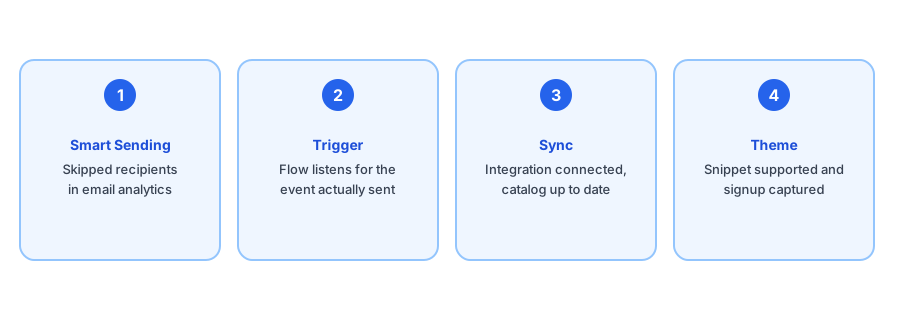
The most frequently cited cause is Smart Sending, a Klaviyo feature that skips a message to anyone who has already received one from you within a time window. One help article puts the default at 16 hours. If a subscriber got a campaign or another flow email shortly before the restock, the back-in-stock email can be quietly suppressed. Open the email action in the flow, look at the recipient analytics, and check for a skipped status with a reason. If Smart Sending is the cause, you can adjust it on that email action, weighing it against the risk of over-mailing your list.
2. The Flow Is Listening for the Wrong Trigger
A flow only runs when its trigger fires. Merchants report back-in-stock flows built on Klaviyo's native metric that never ran because the app they use sends its own event instead, or the reverse. Look at the flow's trigger, then look at the metrics your account is actually receiving, and confirm the two match. If you recently changed apps, added a second tool or rebuilt the flow from a template, this is the first thing to recheck.
3. The Catalog or Inventory Sync Is Stale
Klaviyo learns about stock from its Shopify integration. If the integration is disconnected, delayed or has an out-of-date catalog, Klaviyo may never see the restock even though your store did. Confirm the integration status, then check that the product and variant in question exist in Klaviyo's catalog with the stock you expect. Some merchants find that forcing a resync clears it up.
4. Signups Never Reach the Flow
Another pattern: shoppers appear on your main list but never enter the back-in-stock flow. Threads describe this after adding a marketing opt-in prompt, or when the signup form is not wired to the same event the flow expects. Test it yourself. Sign up with a spare email address on a sold-out product and check whether that profile shows the expected event and enters the flow.
5. The Theme Does Not Support the Snippet
Merchants quote Klaviyo's guidance as saying the back-in-stock snippet is only guaranteed to work on free Shopify themes. On a custom or heavily modified theme, the button may not appear, may not be clickable on sold-out products, or may not capture the signup at all. Cached theme files and a snippet placed in the wrong template can have the same effect. If the button itself is the problem, see our post on making the back-in-stock button work with a custom theme.
Prefer a restock alert that does one job and is easy to test? Griffin is a dedicated Shopify back-in-stock app.
Install Griffin on ShopifyA Quick Test That Narrows It Down
- Subscribe a test email to a sold-out product and note whether the Notify Me action works on your theme.
- Confirm the profile appears with the expected event in Klaviyo.
- Restock the product and watch whether the profile enters the flow.
- If it enters but no email arrives, check Smart Sending and the email action's skipped reasons.
- If it never enters, check the trigger, the sync and the signup path.
The failure point tells you which section above to focus on. Most of this comes from community posts and help articles that change over time, so confirm each step against Klaviyo's current documentation before making changes to a live flow.
When It Is Worth Switching
Klaviyo is a strong email platform, and a back-in-stock flow built on it is a reasonable choice for many stores. But it is a general tool, and every extra moving part, a theme snippet, a catalog sync, a suppression rule, is one more thing to keep working. If you find yourself debugging it regularly, our comparison of Klaviyo back-in-stock alerts and a dedicated Shopify app lays out the trade-offs. If alerts are failing for reasons outside Klaviyo too, our troubleshooting guide covers the common ones.
FAQ
Why is my Klaviyo back-in-stock flow not sending?
The usual suspects are Smart Sending suppressing the message, the flow listening for a different trigger than the one your setup actually fires, a catalog or inventory sync that is stale, or a theme that does not support the back-in-stock snippet. Check them in that order.
What is Smart Sending and why does it block restock emails?
Smart Sending skips a recipient who already received a message from you within a set window, which is 16 hours by default according to one help article. A restock email can be skipped for a subscriber who just got another campaign or flow email. Check the email action's analytics for skipped profiles.
Does the Klaviyo back-in-stock button work on any theme?
Klaviyo's own guidance, as merchants quote it, says the snippet is only guaranteed on free Shopify themes. Custom or heavily modified themes may not display the button or capture the signup.
Should I switch to a dedicated back-in-stock app?
Only if the cause is something you cannot fix cheaply. Many fixes take minutes. Our comparison of Klaviyo and a dedicated app covers when the trade-offs favor each.
The Bottom Line
A silent Klaviyo back-in-stock flow almost always comes down to Smart Sending, the trigger, the sync, the signup path or the theme. Test with a spare email address, find where the profile stops, and fix that step. If you would rather have a tool built for restock alerts alone, Griffin is a Shopify back-in-stock app you can install from the Shopify App Store, free to start.