The first restock email is easy to justify: the shopper asked for it. A second one is a judgment call. Some stores see a follow-up as free extra sales, because plenty of people miss the first email. Others have seen shoppers unsubscribe or mark emails as spam because they felt chased. A follow-up reminder after a back-in-stock email can go either way, and the difference usually comes down to stock, timing and whether the second email says anything new. This guide gives you a way to decide.
Why People Miss the First Email
Restock emails arrive whenever the stock does, which is often not when the shopper can act. Someone might see the email on their phone during a meeting, mean to come back and forget. Others never see it because it landed in a promotions tab. And some people have simply changed their mind or bought elsewhere during the wait. A second restock email can help the first two groups, but it annoys the third, and you cannot always tell them apart.
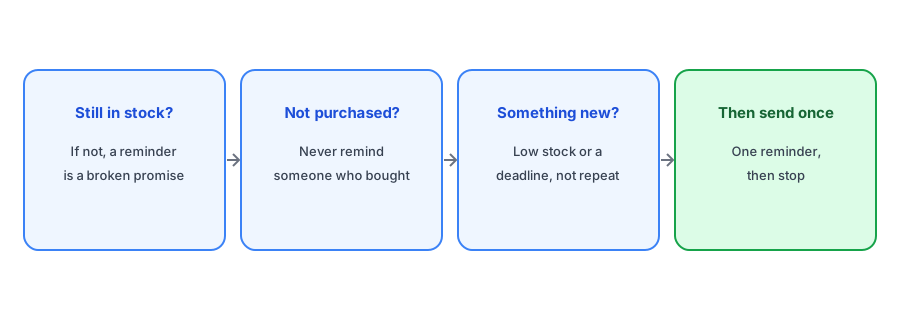
When a Follow-Up Helps
Stock is still available
This is the non-negotiable condition. A reminder about something that has sold out again sends shoppers to a dead end and makes your next restock email less believable. Check availability at the moment the reminder sends, not when it was scheduled.
The shopper has not bought it
A follow up notify me email to someone who already ordered is the clearest way to look careless. If your tool cannot exclude buyers, do not send a reminder at all.
There is something new to say
"Just a reminder, it's back" repeats the first email. A real update is different: only a few units left in their size, a shipping cutoff for a holiday, or the end of a season. Our guide to honest low-stock messaging explains how to say "limited" without inventing urgency.
When It Annoys
- Plentiful stock with no change. If you restocked 400 units and still have 380, the shopper is not missing out. A reminder adds pressure without information.
- Several reminders. One follow-up can be helpful. A sequence turns a requested alert into marketing the shopper never signed up for.
- Reminders that look like a new restock. If the subject line suggests the item just came back again, shoppers may feel misled. Our post on restock emails sent multiple times covers how duplicates confuse people.
- Discount-led reminders. Adding a discount to the second email teaches shoppers to ignore the first. If you use discounts at all, see our guide to discount codes in restock emails.
Restock Reminder Timing
If you decide a reminder is worth sending, timing matters as much as the content. A follow-up the next day catches people who meant to come back. One sent a week later mostly reaches people who already decided, and by then a popular product may be gone. For limited stock, a short gap is better; for plentiful stock, you probably do not need a reminder at all. Whatever you choose, send it at an hour your customers usually shop rather than the middle of the night.
Griffin sends one clear, branded restock email the moment a variant is back, without follow-up sequences you did not ask for. Free to start.
Install Griffin on ShopifyConsent and Frequency
Restock subscribers asked to hear when a product returns. That consent covers the alert itself, and arguably a single, relevant follow-up about the same product. It does not cover adding them to a newsletter or a series of promotions. If you want to market to them more broadly, ask separately, as discussed in our guide to segmenting restock subscribers. Every email should keep a clear way to unsubscribe.
What Griffin Does
Griffin sends one restock email per subscriber when the variant they chose is back in stock, and it checks that the variant is still in stock before each email goes out. It does not send automatic follow-up reminders. If you want to remind people about a limited restock, you can do it deliberately from your own email tool for the specific product, which keeps the decision with you rather than with a default sequence.
A Better Investment Than a Reminder
Often the most effective way to help people who miss the first email is to make that first email better: send it quickly after the restock, name the exact size or color, show the right image and link straight to the variant. Our restock email best practices and subject line examples are a good place to start. A strong first email reduces how often you need a second one.
FAQ
Should I send a second back-in-stock email?
Only if the item is still in stock, the shopper has not bought it, and you have something new to say, such as limited units left. Otherwise one email is enough.
How soon should a restock reminder go out?
For limited stock, within about a day of the first email. For plentiful stock, a reminder is usually unnecessary.
Does Griffin send reminder emails?
No. Griffin sends one restock email per subscriber when their variant is back and checks stock before each send. Reminders are left to your own email tool.
Can I add restock subscribers to my newsletter?
Not without asking. They agreed to a restock alert for a specific product, not to general marketing.
The Bottom Line
A second restock email is worth sending only when stock remains, the shopper has not bought and the message adds something real. Otherwise, invest in the first email. Griffin sends that first email reliably and is free to start: install it from the Shopify App Store.