Almost everything written about restock alerts is about the customer: the shopper who clicked Notify Me and is waiting for an email. But the moment a product returns to stock is also a signal for your own team. Someone should update the homepage banner, someone should tell the customers who messaged support, and someone should know the reorder landed. If your team only finds out when they happen to look at the admin, you are leaving that signal on the table. This post covers how to set up shopify flow back in stock notify staff automations, and how that sits alongside the customer-facing alert.
Who on Your Team Cares About a Restock
The answer depends on the store, but a few roles come up repeatedly. A merchandiser wants to move the product back into prominent collections. A social or marketing person wants to post that it is available. A support person wants to reply to customers who asked when it was returning. And whoever manages purchasing wants confirmation that a shipment was received and counted. None of these people need a customer-style email. They need a short, internal message that says which product, which variant and how many units.
Building It With Shopify Flow
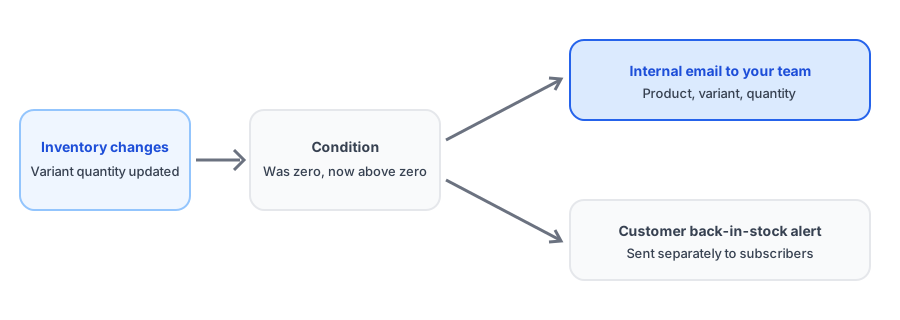
Shopify Flow works as a chain of a trigger, optional conditions and actions. For an internal restock alert, the chain is straightforward. The trigger is the product variant inventory quantity changing. The condition checks that the new quantity is above zero and, ideally, that it was zero before, so the workflow only fires on a real restock and not on every adjustment. The action sends an internal email to a person or shared inbox with the product name and quantity.
That condition is the part people skip, and it matters. Inventory changes constantly: sales, returns, corrections and transfers. An alert that fires on all of them becomes noise within a week and gets filtered out, which defeats the purpose. Tight conditions keep the message meaningful.
Keep the internal message short and useful. A good one names the product and variant, shows the new quantity, and links straight to the product in the admin so whoever receives it can act in one click. If different people own different products or collections, route the email accordingly instead of sending everything to one inbox, where it will be ignored. You can also send the same alert to a shared channel your team already watches, as long as the tool you use supports it.
Pair your internal alert with the customer one. Griffin notifies subscribers when stock returns.
Install Griffin on ShopifyWhen Flow's Built-In Triggers Are Not Enough
Not every event you care about maps neatly to a Flow trigger. Some third-party tools get around that: Hook2Flow, for example, exposes webhook events as Flow triggers, which lets you react to events from systems outside Shopify. Some waitlist apps also ship their own Flow integration so subscriber activity can feed automations. A shopify webhook product restock automation can also be built directly if you have a developer, but check what your existing tools already offer before writing custom code.
Griffin sends the customer-facing alert when inventory returns; it is not a Flow integration, so treat the internal alert described here as a separate, complementary workflow built in Flow.
Keep the Internal and Customer Alerts Consistent
The risk of running two separate systems is that they disagree. If your team is told a product is back while customers are not, or the reverse, someone gets confused. The reliable fix is to base both on the same underlying event, the inventory quantity, and to test them together on a development store. If you want to understand what makes a customer-facing restock message work, our guide to back-in-stock email copy and design that converts is a good companion.
Internal alerts also help you spot trouble. If your team gets a restock alert for a product that was never actually received, that can point to an inventory count error, the kind that also causes false customer alerts. If alerts ever look wrong, our troubleshooting guide for back-in-stock apps covers the common causes. And once you know what your team sees, you can use the data to decide what to reorder; see tracking customer demand on out-of-stock products.
FAQ
Can Shopify Flow send an email when a product restocks?
Yes. A common pattern is a trigger on a product variant's inventory quantity changing, a condition checking the new quantity, and an action that sends an internal email. Build and test it in a development store first.
Is an internal restock alert different from a customer back-in-stock alert?
Yes. A customer alert tells a shopper their item is available. An internal alert tells your own team, such as merchandising, social or support, so they can act: update a campaign, reply to waiting customers, or reorder.
What if I need more than Shopify Flow's built-in triggers?
Some apps expose webhook events as Flow triggers, and some waitlist apps offer their own Flow integrations. Check what your tools provide before building custom code.
How do I avoid getting an alert on every small inventory change?
Add a condition so the workflow only fires when quantity crosses from zero to above zero, not on every adjustment. A noisy alert gets ignored.
The Bottom Line
A restock is news for your team as well as your customers. A small Flow workflow with a tight zero-to-positive condition gets the right people the right message, and it runs alongside, not instead of, the customer alert. Griffin covers the customer side, and you can install it from the Shopify App Store, free to start.