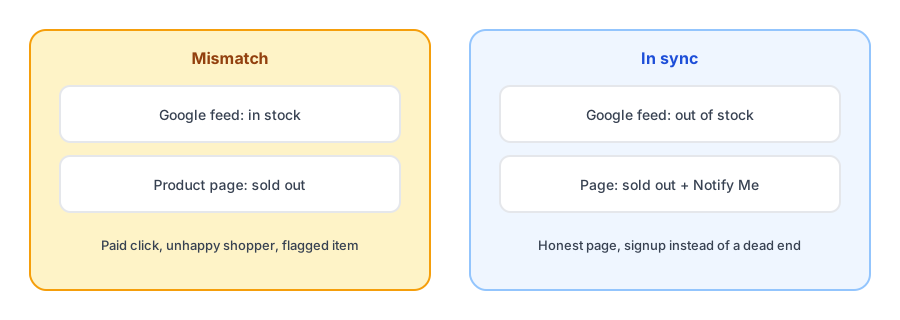
A shopper clicks a Google Shopping ad, lands on your product page, and finds it sold out. You paid for that click, they leave unhappy, and Google may flag the product for a mismatch between your feed and your page. This is not a back-in-stock app problem, but it sits right beside one: both depend on Shopify reporting stock accurately, and the page a sold-out shopper lands on is the page your Notify Me button lives on. A shopify google merchant center out of stock availability mismatch is worth understanding if you advertise, because it affects what you do with sold-out products.
What Google Expects
Google Merchant Center takes an availability value for each product, such as in stock, out of stock, preorder or backorder, and asks that your product data match what a shopper sees on the landing page. When the two disagree, Google can flag the item as a mismatch, and products marked out of stock generally stop appearing in Shopping results. Google has also tightened its expectations for out-of-stock landing pages, reportedly asking for a clearly unavailable purchase button and a backorder label where a product can still be ordered while unavailable. Rules like these change, so confirm the current wording in Google's own Merchant Center help before you act.
Why Shopify and Google Disagree
Merchants in Shopify Community threads describe the same few causes.
- Inventory tracking is off, or continue selling when out of stock is on. Shopify then treats the product as available, so the feed says in stock even when the shelf is empty. We cover that setting in depth in our post on continue selling and Notify Me buttons.
- The feed lags behind the store. Feed updates are not instant, so a product can sell out and still show as available for a while.
- Preorder and backorder status may not pass through. One community thread reports that the free Google sales channel does not sync preorder or backorder status, which pushes merchants toward manual feed fixes.
- Apps that redirect sold-out pages. Redirecting a sold-out product away from its page can break the match between feed and landing page, and one developer write-up recommends turning that redirect off and keeping the page live.
Keep sold-out pages useful. Griffin adds a Notify Me option so a missed ad click can still become a sale later.
Install Griffin on ShopifyKeep the Page Live, Show the Truth
The approach that holds up best is to keep the product page live, make sure it clearly shows as sold out, and let the feed say out of stock too. You keep the URL, its history and its backlinks, and we explain the search side of that in our post on whether hiding out-of-stock products hurts SEO. A shopper who arrives from any source finds an honest page with a way to be told when the item returns. A Notify Me option does not fix a feed disapproval, but it turns a dead end into a signup.
Backorder and Preorder Need Their Own Handling
If you take orders on something you do not currently have, Google distinguishes that from a simple sold-out state, and your page should make the status clear. The difference between the two is the subject of our post on back-in-stock alerts versus preorders. Make sure the feed reflects whichever you actually offer, and do not mix a sold-out page with a feed that says it is available.
A Short Checklist
- Review products in Merchant Center that are flagged for availability and compare each with its live page.
- Check inventory tracking and continue-selling settings on the products involved.
- Confirm sold-out pages show a clearly unavailable purchase button, not a working one.
- Turn off any redirect that sends sold-out products away from their page.
- Add a way for shoppers to be notified so ad clicks on a sold-out page are not wasted.
This is a general overview from community discussion and public guidance, not Google advice, and your feed app may behave differently from the free Google channel.
FAQ
What is an availability mismatch in Google Merchant Center?
It is when the availability in your product data differs from what the product page shows, for example the feed says in stock while the page says sold out. Google asks that feed values match the landing page.
Why does my Shopify store show sold out but Google says in stock?
Common causes reported by merchants include inventory tracking being off, continue selling when out of stock being on, a delay before the feed updates, and apps that redirect sold-out pages. Check the product settings first.
Should I hide out-of-stock products from Google Shopping?
Many merchants let Google show them as out of stock, and some exclude them with a feed rule. It depends on whether you want to keep the listing and its history. Whichever you choose, the page and the feed need to agree.
Does a Notify Me button fix a Google Merchant Center disapproval?
No. It gives shoppers something useful to do on a sold-out page, but it does not change what your feed says. Fix the availability data separately.
The Bottom Line
Google, your product page and your inventory settings all need to tell the same story about stock. Fix the settings that cause mismatches, keep sold-out pages live and honest, and give visitors a way to be notified. Griffin is a Shopify back-in-stock app you can install from the Shopify App Store, free to start.