Sooner or later every sold-out product gets the same message: when will it be back in stock? It arrives by email, live chat, Instagram and TikTok DMs, and answering each one from scratch is slow and inconsistent. The eight replies below cover the situations that come up most, from a confirmed date to a discontinued item. Each is original copy with placeholders in square brackets, and each is short enough to paste into a macro or saved reply.
What Makes a Good Restock Reply
- Be honest about what you know. A guess presented as a promise is worse than saying you are not sure.
- Give a next step in every reply, even when the answer is unknown.
- Offer a way to be told when it returns, so the customer does not have to keep asking.
- Point to an alternative when one genuinely fits, and not otherwise.
- Adapt the length to the channel, but keep the substance the same.
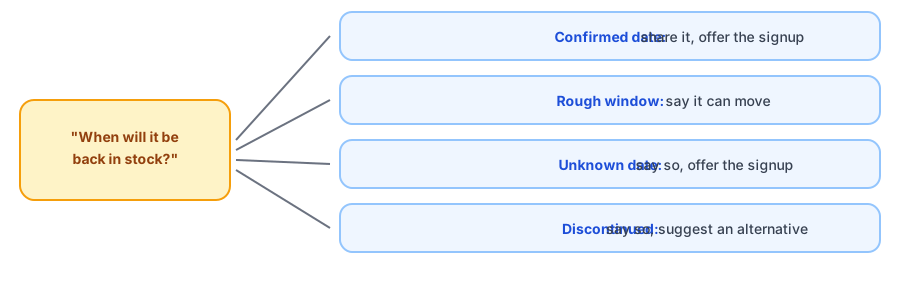
Eight Replies You Can Copy
1. The date is confirmed
Use when: your supplier has given you a firm date.
Hi [Name],
Good news: [Product] is due back on [Date]. If you would like to be told the moment it lands, use the Notify Me button on the product page and we will email you.
Thank you for waiting for it.
2. You have a rough window
Use when: you expect stock soon but the date can move.
Hi [Name],
We are expecting [Product] back in about [Window, such as the next few weeks], but that is an estimate and it can shift. I would rather tell you that than promise a date I might miss.
The best way to hear first is the Notify Me button on the product page. We will email you when it returns.
3. You do not know the date
Use when: there is no confirmed delivery.
Hi [Name],
Honestly, we do not have a confirmed date for [Product] yet, and we do not want to guess. If you add your email with the Notify Me button on the product page, you will hear from us as soon as it is back.
If you need something sooner, [Alternative] is in stock and is a close match.
4. It is discontinued
Use when: the product will not return.
Hi [Name],
Thanks for asking about [Product]. We have decided not to restock it, so it will not be coming back.
If it helps, [Alternative] is the closest thing we have, and [short reason]. Happy to answer questions about it.
5. Only one size or color is out
Use when: the question is about a specific variant.
Hi [Name],
[Product] in [Size or color] is sold out right now, while [Other options] are in stock. We expect [Size or color] back [date or window, or say we do not have a date yet].
On the product page, pick that size and use Notify Me, and we will email you when that exact option returns.
6. It is on backorder
Use when: you take orders before the stock arrives.
Hi [Name],
You can order [Product] now and it will ship when stock arrives, currently estimated for [Date or window]. You will not be charged any differently, and you can cancel before it ships.
If you would rather wait and decide later, the Notify Me button will email you when it is back.
7. Very few units are coming
Use when: the restock will be small.
Hi [Name],
A small batch of [Product] is on the way, about [Number] units, so it may sell out quickly. We cannot hold units for individual customers.
To be among the first to know, add your email with the Notify Me button on the product page.
8. A friendly signup nudge
Use when: you answer the same question often and want a short version.
Hi [Name],
Thanks for asking! We are out of [Product] for now. Tap Notify Me on the product page and we will email you as soon as it is back.
Let shoppers answer the question themselves. Griffin adds a Notify Me button to sold-out product pages and emails them when the item returns.
Install Griffin on ShopifyAdapting Them for Email, Chat and DMs
In email you can include the full reply and a link. In live chat, trim to two sentences and put the next step first. In Instagram and TikTok DMs, keep it to one or two lines and share the product link, since people are reading on a phone between other things. Save each version as a macro or saved reply, and fill in the placeholders before sending so nothing generic goes out.
Where Griffin Fits, and Where It Does Not
Griffin handles the signup part. A Notify Me button on the sold-out product page lets a shopper join with one click, including for a specific size or color, and Griffin emails them when the item is back. It does not write replies or answer chats, so the templates above are yours to use. For related situations, see what to do with subscribers when a product is discontinued, emails for items you cannot ship after an order, and honest low-stock messaging. If your restock is small, read how to handle a limited restock, and for ready-made alerts see our back-in-stock email templates.
FAQ
What should I say when I do not know the restock date?
Say so plainly. Tell the customer the date is not confirmed, that you will not guess, and offer a way to be told the moment it returns. An honest unknown beats a date you miss.
Should I promise a restock date?
Only if your supplier has confirmed it and you can keep it. If you are not sure, give a rough window and say it can move, or give no date at all.
Can I reuse these replies across email, chat and social DMs?
Yes. The substance stays the same. Shorten them for chat and DMs, keep the greeting and the next step, and save each as a macro or saved reply so your team stays consistent.
What does Griffin do for these conversations?
Griffin covers the signup part. A Notify Me button on the sold-out product page lets the shopper ask to be emailed when the item returns, so your reply can point to it. Griffin does not write your replies or chat with customers.
The Bottom Line
The best answer to when will it be back in stock is the truthful one, followed by a way to find out first. Save these replies, adapt them per channel and keep promises you can keep. Griffin is a Shopify back-in-stock app you can install from the Shopify App Store, free to start.