Writing a restock email from scratch is harder than it looks. It has to feel personal without knowing the product, create a reason to act without inventing pressure, and fit in a few lines. If you are looking for a back-in-stock email template you can adapt in a few minutes, the eight below cover the situations that come up most. Each gives a subject, heading, body and button label you can paste into your template settings and edit to match your voice. For the reasoning behind good restock copy, start with our guide to back-in-stock email copy and design that converts.
How to Use These Templates
Most restock apps apply one template to your whole store, so choose a neutral default for everyday use and swap in a special version for the occasional unusual restock. In Griffin, the subject line can include the product title with {ProductTitle}, the heading can include the subscriber's name with {FullName}, and the body text, button label and footer are yours to edit. If a subscriber has no name on file, the name drops out cleanly instead of leaving a gap. Every email also shows the product, its image if you leave images on, and a button that links straight to the variant the shopper chose. Keep your wording short, and leave the product details to the email itself.
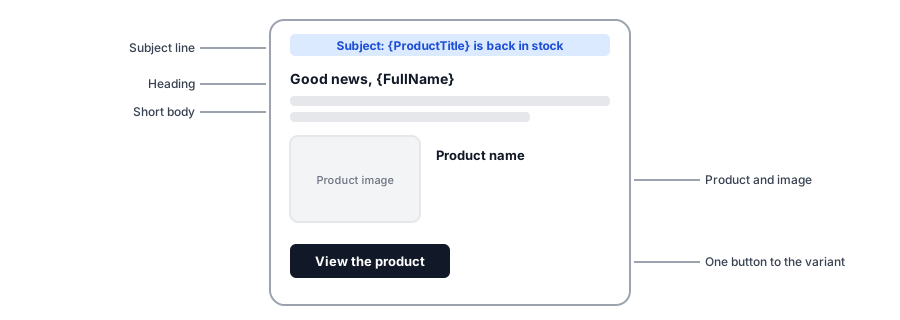
Eight Templates
1. The plain restock
Use when: you want one reliable default for every product.
- Subject: {ProductTitle} is back in stock
- Heading: Good news, {FullName}
- Body: The item you asked us to watch is available again. Stock moves quickly, so we wanted you to hear first.
- Button: View the product
2. Limited units
Use when: a small batch arrived and the waitlist is longer than the stock.
- Subject: {ProductTitle} is back, in limited numbers
- Heading: It is back, {FullName}
- Body: We received a small batch and a lot of people asked to be told. Units are limited and sold on a first-come basis, so we would not wait.
- Button: Get yours before they go
3. After a long wait
Use when: the product was gone for weeks and the shopper may have forgotten signing up.
- Subject: You asked about {ProductTitle}. It is available.
- Heading: Thank you for waiting, {FullName}
- Body: You signed up to hear when this returned, and it has. We know it took longer than we hoped, and we appreciate your patience.
- Button: Shop now
4. A specific size or color
Use when: your catalog is variant-heavy and shoppers pick one option.
- Subject: The one you wanted is back: {ProductTitle}
- Heading: The option you chose is available
- Body: The size or color you asked about has returned. The button below takes you straight to it, so you can check out in a minute.
- Button: Go to my option
5. Gift season
Use when: a holiday or event deadline is close.
- Subject: {ProductTitle} is back in time for gifting
- Heading: Back in stock, {FullName}
- Body: This one is available again with enough time to arrive for the holidays if you order soon. Check our shipping cutoff on the product page.
- Button: Order now
6. Calm, premium tone
Use when: your brand is quiet and understated.
- Subject: {ProductTitle} has returned
- Heading: Available again
- Body: The piece you were waiting for has returned. We kept it simple, as you asked: here it is.
- Button: View
7. Friendly and playful
Use when: your brand voice is casual.
- Subject: Plot twist: {ProductTitle} is back
- Heading: Look who showed up, {FullName}
- Body: You asked us to tell you the second it returned, so here we are. Come and get it.
- Button: Take me there
8. Back in stock with a tip
Use when: the product has a common question, such as fit or care.
- Subject: {ProductTitle} is available again
- Heading: Back, and ready to ship
- Body: It is back. Before you order, remember that our sizing runs true, and our returns are easy if it is not quite right.
- Button: Shop now
Paste any of these into Griffin's email settings. Change the subject, heading, body and button in one place.
Install Griffin on ShopifyRules That Make Any Template Better
- Name the exact product in the subject so the shopper knows it is the email they asked for.
- Say what is true. If stock is limited, say so; if it is not, do not pretend it is.
- One button, one destination, ideally the exact variant.
- Keep the sender name recognizable. A clear store name helps both trust and inbox placement; see why restock emails land in spam.
- Leave promotions out unless you have decided to include them on purpose; our post on discount codes in restock emails explains when that makes sense.
Situations That Need Special Handling
Some restocks call for more than a tweak. If the price changed while people waited, say so plainly, as we explain in our post on price changes. If you received far fewer units than there are subscribers, plan the send using our guide to limited restocks and waitlists. And check that your email shows the right photo for the variant, which is the topic of why a restock email shows the wrong product photo.
FAQ
Can I use the same restock email template for every product?
You can, and most stores do, since many restock apps apply one template store-wide. Keep the wording neutral enough to fit any product, and change it temporarily for special cases such as a limited restock or a price change.
How long should a back-in-stock email be?
Short. The shopper already wants the product, so the email only needs to say it is back, show the item and give one clear button. A few sentences is enough.
Should I add urgency to a restock email?
Only if it is true. If units are limited, say so plainly. Invented urgency teaches subscribers to ignore you and can feel manipulative.
What should the subject line say?
Name the product and say it is available. Plain subjects that mention the exact item tend to feel more trustworthy than generic hype, and they make it clear the email is the one the shopper asked for.
The Bottom Line
A good restock email is short, specific and honest. Start from one of these templates, make it sound like your store, and keep a special version ready for limited restocks and long waits. Griffin is a Shopify back-in-stock app you can install from the Shopify App Store, free to start.