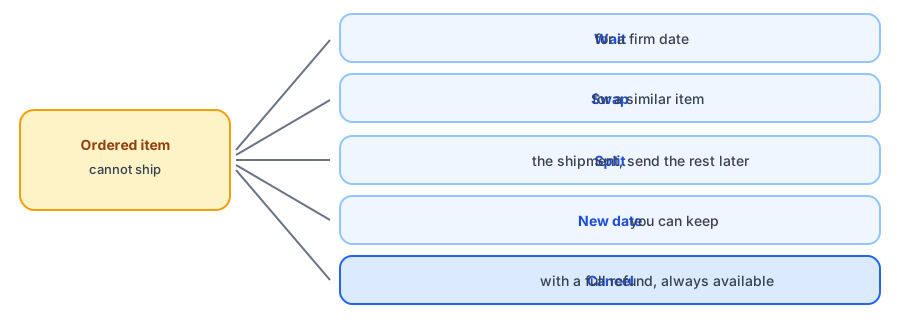
Few emails are harder to write than the one that says you cannot ship something a customer already paid for. Written badly, it creates a chargeback, a one-star review and a lost customer. Written well, it can leave the customer trusting you more than before. If you need an out of stock email to customer template, the six below cover the situations that come up: waiting, swapping, partial shipments, a new date, a refund, and an apology. Each is original copy with placeholders you replace in square brackets.
The Principles Behind All Six
- Tell them early. Silence is what customers resent, not the stockout itself.
- Say exactly what is affected: the order number and the item.
- Give a real choice, always including a refund, and make each choice a single reply.
- Only give a date you can keep. A second missed date does more damage than the first.
- Keep it short and human. Sign it with a real name or team, and let people reply.
Six Templates
1. Keep waiting, with a firm date
Use when: you will have stock soon and most customers will wait.
Subject: An update on your order [Order number]
Hi [Customer name],
Thank you for your order. One item, [Product], is temporarily out of stock, and we expect it to ship by [Date].
If you would like to wait, you do not need to do anything. We will send tracking as soon as it ships. If you would rather cancel or choose an alternative, just reply and we will take care of it right away.
Thank you for your patience.
2. Offer a swap
Use when: a similar item is available and you can ship it now.
Subject: About your order [Order number]: a quick choice
Hi [Customer name],
We are sorry: [Product] sold out before we could ship your order. We do have [Alternative], which is [short reason it is a good match], and we can send it at the same price.
Reply with swap and we will ship it in [Processing time]. If you would prefer to wait for the original or cancel for a full refund, tell us and we will do that instead.
3. Ship now, send the rest later
Use when: only part of the order is affected.
Subject: Part of your order is on its way
Hi [Customer name],
Most of your order shipped today, and your tracking is attached. [Product] is out of stock, and we expect to send it by [Date], at no extra shipping cost.
If you would rather not wait for that item, reply and we will refund it straight away.
4. A new date, after a delay
Use when: you promised a date and cannot keep it.
Subject: New date for your order [Order number]
Hi [Customer name],
We told you [Product] would ship by [Old date]. Our supplier is running late, and the new date is [New date]. We are sorry for the change.
You can keep your order as it is, switch to something else we have in stock, or cancel for a full refund. Tell us what you prefer and we will do it today.
5. Cancel and refund
Use when: the item is gone for good or you have no reliable date.
Subject: Your order [Order number] has been cancelled and refunded
Hi [Customer name],
We are sorry: [Product] is no longer available and we cannot give you a reliable ship date, so we have cancelled that part of your order and issued a full refund.
The refund will appear according to your payment provider's timing. If you would like a recommendation for something similar, reply and we will help.
6. With a goodwill gesture
Use when: the customer had to wait longer than they should have.
Subject: We owe you an apology about order [Order number]
Hi [Customer name],
Your order took longer than it should have, and we apologize. As a thank-you for your patience, we have added [gesture, such as free shipping on your next order].
If there is anything we can fix on this order, just reply to this email and a real person will help.
Prevent the next one. Griffin captures demand on sold-out products so you can see what to reorder before orders outrun your stock.
Install Griffin on ShopifyHandle the Inventory Side Carefully
When you cancel or refund an order for an item you never had, be careful about returning it to inventory. Shopify's cancel and refund screens let you choose whether items go back into stock; if the item is not physically on your shelf, leave that off. A phantom unit can make the product look available and trigger restock alerts to people waiting for it, which we explain in our post on false back-in-stock alerts.
Know the Rules Where You Sell
Many places have consumer rules about shipping delays, such as requirements to notify customers and offer them the chance to cancel if you cannot ship within the time you promised. They vary by region and by the kind of sale, so check the requirements where you operate. This post is not legal advice.
Prevent the Next One
Most of these emails trace back to selling stock you do not have. Check your inventory settings; the continue selling setting is a common cause, and we explain it in our post on that setting. Set reorder points so you stop running out, using our reorder point calculator, and see nine things to do when a product is out of stock for the options that keep a sale alive. For recurring orders, read what happens to subscription orders when a product sells out. Griffin does not send these order-delay emails; it handles restock alerts for shoppers who are waiting.
FAQ
How quickly should I tell a customer an item is out of stock?
As soon as you know. Customers forgive a stockout far more readily than silence. A prompt message with clear options usually saves more orders than a perfect message sent late.
Should I always offer a refund?
Yes, make it an easy option alongside any alternative. Some places have rules that require telling customers about shipping delays and offering them the chance to cancel, so check the requirements where you sell. This is not legal advice.
Is this the same as a back-in-stock email?
No. A back-in-stock email goes to someone who asked to be told when a sold-out item returns. These emails go to someone who already bought something you cannot ship, so the tone and options differ.
Do I need to restock the item when I cancel the order?
Only if it is actually back on your shelf. If the item never existed in your stock, restocking it on cancellation creates a phantom count, which can cause false alerts later.
The Bottom Line
The email you send when you cannot ship matters more than most marketing emails, because the customer is already deciding whether to trust you. Be early, be specific, offer real choices and keep your word on dates. Griffin is a Shopify back-in-stock app you can install from the Shopify App Store, free to start.