"I signed up and never got an email" is one of the most common messages a store with restock alerts will receive. The answer is almost never "the app is broken": it is usually one of a short list of causes, and each one has a different thing to check and a different thing to say. The tool below asks two questions, what double opt-in is set to and what the notification looks like in the app, and returns the likely cause, what to check and a reply you can copy. If a customer says they did not get a back-in-stock email, this gets you to an answer in a couple of minutes. The reply texts use brackets for the facts only you know.
The Support Triage Tool
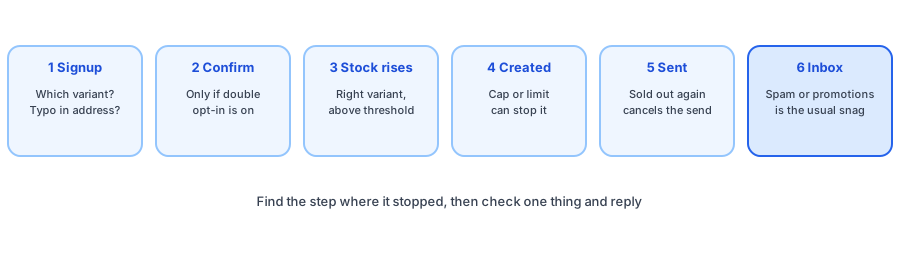
The Path an Email Takes
It helps to know the steps, because each one fails in its own way. First the shopper signs up for one variant. If double opt-in is on, they must confirm; it is off by default, in which case the signup confirms itself. When Shopify reports that the variant's stock has risen above its notification threshold, Griffin creates a notification for each confirmed subscriber of that variant. Before each send it checks that the variant is still in stock, and the email then goes out, with temporary failures retried a few times. Finally the receiving mail system accepts it and it lands in the inbox, or the spam folder.
If the shopper confirms after the product has already restocked, the app can send the email at once; this is a setting that is on by default, and you can confirm its name in the notification settings.
Causes From the Shopper's Side
- A different variant. The alert is tied to the exact size or color chosen, which is why the variant-level alerts guide matters.
- An unconfirmed signup, when double opt-in is on. Our double opt-in and GDPR guide explains the trade-off.
- Spam or promotions. See why restock emails go to spam.
- A typo in the address, or a mailbox that no longer works.
- Unsubscribed or removed, sometimes by accident.
Causes From Your Side
Some causes are yours to fix. A store that reaches its monthly notification limit sees the remaining emails queue until the period resets, as the free plan limits guide explains. A per-restock cap cancels emails beyond it; see the notification cap guide. Stock that was never tracked or that Shopify never reported as rising will not trigger anything, which the track quantity guide covers. For merchant-side checks on delays, use the notification delay checklist, and to see delivery statuses, the delivery tracking guide.
How to Reply Well
- Start from what the records show, not from a guess, and say so.
- Do not promise a resend if the product is sold out: sending someone to an empty page makes the experience worse.
- Ask for one thing: the variant, or the address, or a look in spam.
- Give a next step. Even a no deserves a way to get notified next time.
Our eight reply templates cover the follow-up question, when it will be back.
Preventing the Ticket
Most of these tickets are avoidable. Say on the signup form which variant the shopper is signing up for, and what the email will look like. Run a test signup yourself with the test notification guide after any change to your theme or settings. Griffin, a Shopify back-in-stock app, adds a Notify Me popup or inline form to sold-out products, emails the shoppers who signed up when the variant returns and keeps signups in its own records. The free plan includes 100 notifications a month. Griffin does not write your support replies or monitor shoppers' inboxes.
Fewer missing-email tickets start with a clear signup and honest statuses. Griffin shows each notification's status so you can answer fast.
Install Griffin on ShopifyFAQ
Why would a shopper not get a back-in-stock email?
The common reasons are an unconfirmed signup when double opt-in is on, a signup for a different variant than the one restocked, an email that went to spam or promotions, a typo in the address, a product that sold out again before the send and a store that has reached its notification limit.
Can I resend a back-in-stock email to one customer?
That depends on your app. In Griffin you can retry a failed notification and send manually from the app, but a sold-out product should stay unsent so the shopper is not sent to a dead end. Confirm the options in the app for your plan.
What does Delivered mean on a restock email?
It means the receiving mail system accepted the message. It does not mean the shopper opened it or that it reached the main inbox.
Does Griffin write support replies?
No. Griffin captures restock signups on sold-out products and variants and emails those shoppers when the item is back. The replies in this post are written for you to adapt.
The Bottom Line
A missing restock email has a cause, and the notification's status usually points to it. Find the step that failed, check the one thing that matters and reply with what the records show. Griffin is a Shopify back-in-stock app you can install from the Shopify App Store, free to start.