A shopper adds the last unit of a product to their cart, gets distracted and comes back an hour later to find it gone. Another shopper reaches checkout and is told an item is no longer available. Merchants see the result as complaints, abandoned carts and, later, subscribers asking to be told when it returns. Understanding shopify out of stock in cart inventory reservation helps you explain what happened and set up your store sensibly. We checked Shopify's help documentation for this post, but the details of checkout behavior can change and the pages we found were not recent, so confirm with current documentation or a test on your own store before relying on any specific claim.
What a Cart Does and Does Not Do
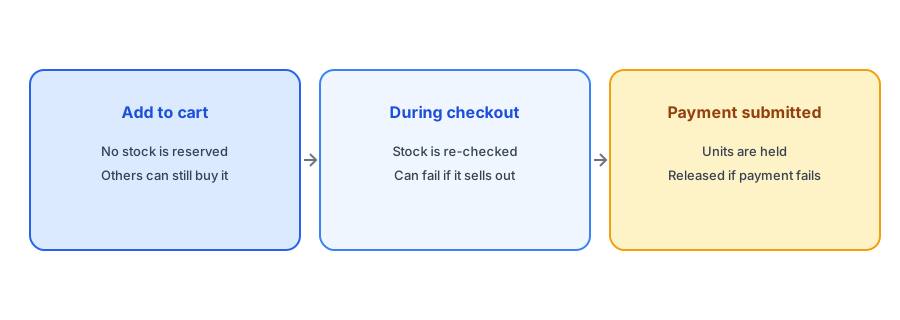
According to Shopify's documentation, adding a product to a cart does not reserve it. The cart is a list of intent. If five people each have the last unit in their carts, nothing stops the first one to complete checkout from buying it. The others will find, at some point in checkout, that the item is no longer available. That is why a "last one" can vanish from a cart without anyone noticing.
Where the Hold Starts
Shopify's help pages describe inventory being re-validated after each checkout step and held only once the customer submits payment details. If the payment fails, the hold is released until the customer reaches the payment step again. Some payment methods that take time to confirm can hold stock for longer. The practical point is that the hold is late and short. A shopper who is slowly working through checkout is not holding a unit for anyone else until payment is submitted.
What Shoppers See When Stock Runs Out Mid-Checkout
When a unit sells before a shopper finishes, they may see a message that an item in their cart is unavailable. That is a frustrating moment, because they were close to buying. It is also a moment of high intent, which is worth treating as a missed opportunity rather than only a problem. If your sold-out product page offers a Notify Me option, a shopper who goes back to it can still be caught. Our post on what every sold-out page should show covers how to make that page useful.
Catch the shopper whose cart item sold out. Griffin adds Notify Me to each sold-out variant.
Install Griffin on ShopifyAbandoned Carts and Released Stock
Because carts do not hold stock, an abandoned cart does not tie up inventory. When a shopper abandons a cart containing a product that later sells out, a reminder email from your abandoned cart flow may point to something that is no longer available. Check how your flows handle this, and consider whether the reminder should switch to a restock message instead. Our guide to email flows every store needs explains where back-in-stock fits alongside abandoned cart emails, and how restock alerts reduce cart abandonment covers the connection.
How This Interacts With Restock Alerts
A restock alert triggers when a sold-out variant becomes available again. If a held unit is released, for example after a failed payment, the product may flip briefly from sold out to available. Depending on your setup, that can look like a restock, and subscribers might be told a product is back when it is available for only a moment. This is one reason some merchants see alerts for products that sell out again almost at once; our post on false back-in-stock alerts explores related causes. If you see this pattern, check your alert timing and how many units are actually available.
Overselling and Continue Selling
If you allow customers to keep buying when stock reaches zero, none of this applies in the same way, because the product never shows as sold out. That setting has its own consequences for alerts, covered in our post on alerts when continue selling is on. Decide deliberately which model you want for each product.
A Practical Checklist
- Do not assume a cart item is reserved; confirm current behavior in Shopify's documentation or by testing.
- Keep a Notify Me option on sold-out product pages so a failed checkout is not a dead end.
- Review abandoned cart emails for products that may have sold out.
- Watch for products that flip between sold out and available around checkout.
- Decide per product whether continue selling is appropriate.
FAQ
Does adding an item to a Shopify cart reserve it?
According to Shopify's help documentation, no. Stock is checked during checkout and held only once payment details are submitted.
Why did an item in my customer's cart become unavailable?
Another customer likely completed checkout first, since carts do not hold stock.
Can a released hold trigger a restock alert?
It can appear that way if a product briefly returns to available after a failed payment. Check your timing and available quantity if you see this.
What should a shopper see if stock runs out during checkout?
A clear message and, ideally, a sold-out page with a Notify Me option so they can be told when it returns.
The Bottom Line
Carts hold intent, not stock, and the real hold starts at payment. Build your sold-out experience around that fact. Griffin is a Shopify back-in-stock app you can install from the Shopify App Store, free to start.