Imagine paying for a click and sending the shopper to a page that says sold out. They came excited, they cannot buy, and you have paid for the privilege. For stores that advertise, this is one of the most avoidable leaks in the budget, and it happens more often than most owners realize, because stock changes quickly and ad systems do not always hear about it right away. This guide helps you estimate the leak, understand why ads keep running, and fix it. If you are looking to pause ads for out-of-stock products, start with the estimator below.
Estimate Your Leak
Enter the daily ad spend that points at a product, the number of days it is sold out in a typical month, and how many days it takes your ads to stop after stock hits zero. The values shown are examples.
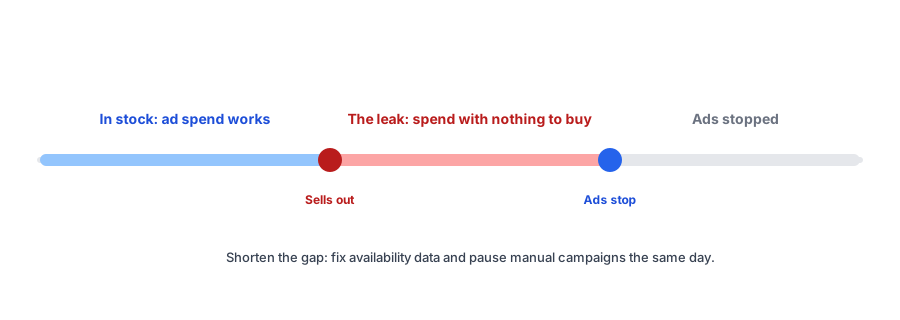
Why Ads Keep Running for Sold-Out Products
- Catalog or feed lag. Meta's developer documentation says products marked out of stock stop serving in catalog ads, but only after the catalog is updated, so the delay between your store and the platform is the leak.
- Settings that hide the stockout. If inventory tracking is off, or continue selling when out of stock is on, a channel may treat the product as available, and one source reports quantities that look enormous to Meta. Our post on continue selling explains the setting.
- Feed mismatches. Google asks that feed availability match your page; see Merchant Center availability.
- Manual campaigns. Ads, posts and influencer links you set up by hand do not know about stock at all.
A Fix List, in Order
- Check inventory tracking and continue-selling settings on the products you advertise most.
- Look at the catalog or feed in each channel and filter for availability, so you see what the platform sees.
- Set an alert for your own team when a variant sells out. Shopify Flow has a trigger for a variant's stock falling to zero or below, as described in its changelog, which you can use to email or message the person who manages ads. The trigger works per variant, and test it by lowering a test variant's stock.
- Pause manual campaigns for the product the day it sells out.
- If your ad platform needs an explicit signal, mark the item out of stock in the feed rather than relying on lag.
- Decide what happens when it returns: re-enable the ad and, ideally, alert subscribers first.
You may see guides that unpublish sold-out products with a workflow. We found no reliable source confirming that this stops ads on every channel, and unpublishing has SEO costs, as we explain in our post on out-of-stock products and SEO. Fix the availability data first.
If you keep an ad live, make the click count. Griffin adds Notify Me to sold-out pages so a click becomes a signup.
Install Griffin on ShopifyWhen You Keep the Ad Live on Purpose
Sometimes a product is worth advertising even when sold out, for example when a restock is days away and demand is building. In that case, the landing page matters. It should say sold out clearly, offer Notify Me, and show alternatives; use the sold-out page checklist to check it. Then the click produces a signup you can email when stock returns. Griffin handles that signup and the alert, and does not manage ads.
Know What It Cost You
Pair this estimator with the lost-sales calculator to see both sides of a stockout: the revenue you could not serve and the spend you wasted. And to stop the problem at the source, set reorder points with our reorder point calculator.
FAQ
Do ad platforms stop showing sold-out products automatically?
Meta's documentation says products marked out of stock in the catalog stop serving in catalog ads, but only after the catalog updates. Lag and settings in Shopify can keep sold-out items looking available. Check your own catalog.
Why does Meta or Google show my product as in stock when it is sold out?
Common causes are catalog or feed lag, inventory tracking turned off, and continue selling when out of stock being on, which can make the available quantity look very large to a channel.
Should I unpublish a product when it sells out to stop ads?
We found no reliable source confirming that unpublishing stops ads on every channel, and unpublishing affects your SEO. Fix availability data first, and pause manual campaigns directly.
What if I want to keep an ad live for a sold-out product?
Make sure it lands on a page that says sold out clearly and offers Notify Me, so the click becomes a signup instead of a bounce.
The Bottom Line
Sold-out products should not keep spending your budget. Estimate the leak, fix the data your ads depend on, give your team a signal when a variant sells out, and when you do keep an ad live, send the click somewhere useful. Griffin is a Shopify back-in-stock app you can install from the Shopify App Store, free to start.