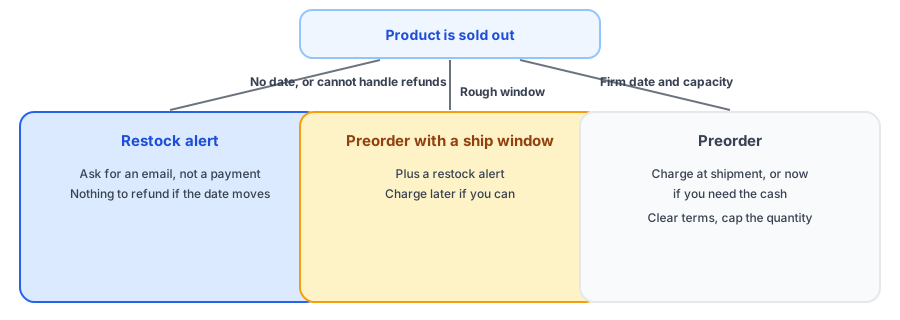
A sold-out product leaves you three broad choices: let people wait, let them order now and ship later, or do nothing. Preorders are the second choice, and they are attractive because they turn a stockout into revenue. They are also a promise with a date attached, and promises are expensive to break. Before you set one up, it is worth asking whether a restock alert would serve you better. This guide gives you a four-question tool to decide, then walks through how to set up preorders on Shopify safely if that is the right call. If you wanted to know how to set up preorders you can stand behind, the tool comes first.
The 4-Question Decision Tool
What Shopify Gives You
Sources we found say Shopify has no native preorder mode. The basic workaround is the continue selling when out of stock setting, which lets orders come in after stock hits zero, but it has no separate cap for preorders and changes how your storefront and alerts behave; see our post on that setting. Real preorder features, such as quantity limits, deposits and delayed charges, generally come from apps built on Shopify's selling plans. Check what your plan and any app you choose support, and confirm how an app interacts with your inventory settings before launch.
How to Set Up Preorders Safely
- Decide the model first: full payment now, deposit, or charge at shipment.
- Publish a ship window, not a single date, unless you control the whole supply chain.
- State the price charged, the ship window and your refund policy near the buy button and in the confirmation email.
- Cap the quantity if you can, so you never sell more than you can supply.
- Plan payment timing carefully. Charging at shipment lowers refund risk if the date slips, but card authorizations can expire, and sources suggest this can happen anywhere from about a week to a month, so ask your payment provider. A deposit with a fixed balance date can charge customers for a delayed order, so tie any balance to the actual ship date.
- Tell customers about delays early. A delay announced weeks ahead is manageable; one announced the day before is a refund request. Our out-of-stock email templates include new-date and refund versions.
- Offer an easy way to cancel before shipment.
Some places have rules about missed shipping dates, such as requirements to notify customers and offer a refund or the chance to consent to the delay. They vary by region, so check the requirements where you sell. This is not legal advice.
Not ready to promise a date? Griffin captures demand with a restock alert instead, with a free plan.
Install Griffin on ShopifyWhy a Restock Alert Is Often the Safer Start
A restock alert asks the shopper for an email address, not a payment, and promises only one email when the product is back. That makes it forgiving: if the date moves, nothing needs refunding. It does not bring in cash before the stock arrives, which is the preorder's advantage, and it will not suit every product. Many stores use both, preorders for items with a firm date and alerts for the rest. Griffin handles the alert side and does not offer preorders. For the full comparison, read back-in-stock alerts versus preorders, and see nine things to do when a product is out of stock for the wider options.
Preorders and Your Other Inventory Settings
Preorders interact with the rest of your setup. A product on continue selling will not show as sold out, so a Notify Me button may stay hidden; a preorder app may manage that setting for you while the campaign runs. Feeds and ads may report the product as available, as covered in our posts on Google Merchant Center availability and stopping ads for sold-out products. And if you offer subscriptions, read what happens to subscription orders when a product sells out.
FAQ
Does Shopify have a built-in preorder feature?
Sources we found say there is no native preorder mode. The usual workarounds are the continue selling when out of stock setting, which is basic and has no separate cap, or an app that builds preorders on Shopify's selling plans. Check what your plan and apps offer.
Should I charge customers now or when the preorder ships?
Charging now helps cash flow and commitment. Charging at shipment lowers refund and chargeback risk if the date slips, but card authorizations can expire, so check how your payment provider handles delays. Decide based on how firm your date is.
What is the difference between a preorder and a backorder?
A backorder is usually for an item that normally sells and is temporarily out, shipped when stock returns. A preorder is usually for something not yet available. The labels overlap, so what matters is being explicit about the ship window.
When is a restock alert better than a preorder?
When you do not know when stock returns, when you cannot handle refunds and date changes, or when you would rather not take payment for something you cannot ship. A restock alert asks for an email, not a commitment.
The Bottom Line
Take a preorder only when you can keep the promise: a believable date, the capacity to handle changes, and clear terms. Otherwise a restock alert captures the same demand with far less risk. Griffin is a Shopify back-in-stock app you can install from the Shopify App Store, free to start.