When a product sells out and the waitlist grows, the temptation is to read the list as demand: two hundred people want it, so order two hundred. That overstates demand, because many subscribers will not buy when the email arrives. They found an alternative, changed their mind, did not see the email or cannot afford it now. At the same time it ignores everyone who never signed up but will buy anyway. A waitlist to order calculator should therefore combine the waitlist with your own conversion experience and your normal sales. This post gives the formula, a spreadsheet layout and a worked example. We quote no benchmarks, because conversion varies widely, and the example numbers are illustrative.
The Formula
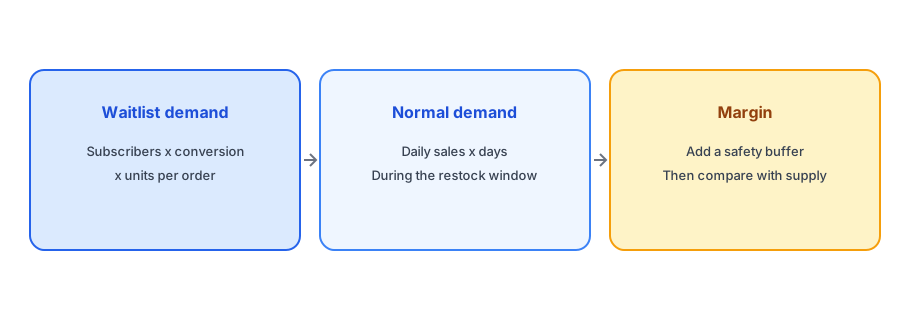
Reorder quantity has three parts. First, waitlist demand: the number of active subscribers for the variant, multiplied by the share you expect to buy, multiplied by the average units each buyer takes. Second, normal demand: your usual daily sales of the variant, multiplied by the number of days the new stock needs to cover. Third, a safety margin: extra units for uncertainty. Add the three, then compare the total with what your supplier can deliver and what you can afford. In a spreadsheet: waitlist demand equals subscribers times conversion times units per order; total equals waitlist demand plus daily sales times cover days, multiplied by one plus the margin percentage.
Where to Get Your Conversion Rate
Use your own history. After a past restock, divide the number of subscribers who bought by the number notified; our guide to measuring revenue from back-in-stock alerts explains how to attribute orders. If you have no history yet, do not borrow a number from a blog. Run three scenarios instead: a cautious one, a middle one and an optimistic one, and see how the quantity changes. A cautious rate protects cash, an optimistic one protects against a second stockout, and the gap between them tells you how much the answer depends on an assumption you cannot yet check.
A Worked Example (Illustrative)
Suppose a variant has 120 active subscribers, you assume that 25 percent will buy, and each buyer takes one unit. Waitlist demand is 120 times 0.25 times 1, which is 30 units. Normal sales are 2 units a day and the new stock must cover 21 days, so normal demand is 42 units. The sum is 72. With a 20 percent margin, the quantity is 72 times 1.2, which is about 86 units. If the optimistic scenario is 40 percent, waitlist demand is 48 and the total is about 108. These numbers are invented to show the arithmetic. Your own rates and sales will differ, and the point is the method, not the figures.
Build your waitlist with real, variant-level signups. Griffin shows demand insights per product and is free to start.
Install Griffin on ShopifyAdjust for Stale and Duplicate Signups
Not every subscriber is still interested. Old requests lose value, and some people sign up for several variants of the same product. Before you count, trim the list: use only active requests and, where a person signed up for more than one variant, count them once at the variant they are most likely to buy. Our guide to cleaning up subscriber lists explains how to think about aging requests.
Factor in Lead Time and Cash
The calculation gives a target, not an order. Compare it with your supplier's minimum order quantity, your lead time and your cash. If lead time is long, you may sell out again before stock arrives, so your normal-demand term should cover the full time until the next order could land. Our post on reorder points and safety stock goes deeper, and for a first run of a new product, see the new-product quantity calculator.
Check After the Restock
After the restock, record what happened: how many subscribers were notified, how many bought and how fast the stock sold. That gives you a real conversion rate for next time. Over a few restocks, your estimate becomes a measurement. Our post on calculating your Notify Me signup rate shows how to track the front end of the funnel.
A Practical Checklist
- Count only active subscribers, once per person per variant.
- Use your own conversion rate, or run cautious, middle and optimistic scenarios.
- Add normal sales over the full cover period.
- Add a safety margin and compare with supplier minimums and cash.
- Record the actual result after each restock.
FAQ
How many subscribers will buy when I restock?
It varies by product and audience. Use your own past restocks to estimate it, or run cautious, middle and optimistic scenarios if you have no history.
Should I order one unit per subscriber?
Usually not. Many subscribers will not buy, so multiply by your expected conversion rate and add normal sales.
What safety margin should I add?
It depends on how costly a second stockout is compared with leftover stock. Start modestly and adjust with experience.
Does the formula work without waitlist history?
Yes, using scenarios. The result is a range, and each restock gives you data to narrow it.
The Bottom Line
Treat the waitlist as one input, not the answer. Convert it with your own rate, add normal demand and a margin, and learn from each restock. Griffin is a Shopify back-in-stock app you can install from the Shopify App Store, free to start.