Your first order for a new product is the one you know least about. Order too few and you sell out on launch day with no way to reorder fast enough. Order too many and the cash sits on a shelf. The calculator below does not predict demand, because no calculator can. It turns your own assumptions about audience, conversion and safety margin into a defensible starting quantity, shows how far off you would be if you are wrong, and helps you decide how much to order now. If you have wondered how much inventory to order for a new product, this gives you a number and a plan to learn fast. The values shown are examples.
The First-Run Calculator
How the Number Is Built
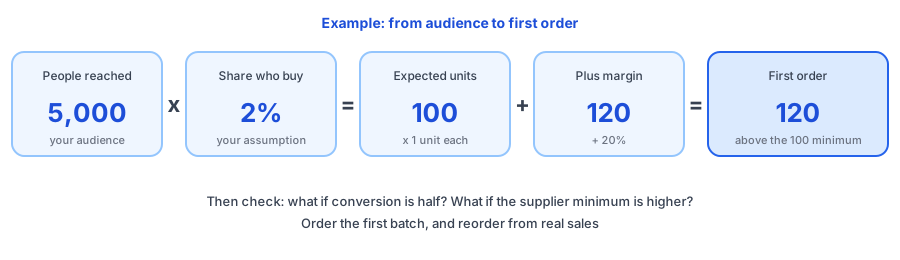
Expected units sold is the audience times the share you expect to buy, times units per buyer. Add your safety margin to cover a better-than-expected launch, then round up to a whole case and up to your supplier's minimum if it is higher. In the example, 5,000 people at 2 percent is 100 buyers. At one unit each and a 20 percent margin, you would suggest 120 units, above the 100 minimum, so you order 120. At 12 each, that is 1,440 of cash committed.
Two other numbers matter as much. The conversion at which you sell out tells you how good a launch has to be before you run out. The units left at half your assumption show what a miss costs. If the second number frightens you, order less, or negotiate a smaller first batch.
Be Honest About the Audience
The audience is the weakest input, so count only people you can actually message at launch: your email list, and social followers you will really reach. A large following does not mean a large launch. Without sales history for the product, avoid borrowing conversion figures from articles, including ones that sound authoritative. Use what you know: how your last launch went, how your email list responds to new products or what a small test showed.
Stage the Order and Learn Fast
- Order the first batch, not the whole season. Hold back the budget for a reorder once real sales show up.
- Ask the supplier for lead times on a repeat order before you launch, so you know how long a sell-out would last. Our reorder point and safety stock calculator turns that lead time into a trigger.
- Watch the first two weeks of sales against your assumption and recalculate, then use the days of inventory left calculator to see when to reorder.
- Decide in advance what a sell-out looks like: a Notify Me form, an honest message and a date. See the sold-out page checklist.
Measure Interest Before You Launch
Griffin cannot do this for you: it does not offer pre-launch waitlists, because it works on products already in your store that sell out. To test interest first, collect emails with a signup form, or run a preorder; our guides on setting up preorders or a restock alert and on back in stock alerts versus preorders compare the options. After launch, if the product sells out, Griffin, a Shopify back-in-stock app, adds a Notify Me popup or inline form on the sold-out variant and emails shoppers when stock returns. The free plan includes 100 notifications a month.
If your launch outsells the plan, the sold-out page should still capture demand. Griffin adds Notify Me to sold-out variants.
Install Griffin on ShopifyFAQ
How much inventory should I order for a new product?
Start from the demand you can reasonably reach: your audience size times the share you expect to buy, times units per buyer, plus a safety margin. Then compare it with your supplier's minimum order and decide how much to commit now and how much to hold back for a reorder.
What conversion rate should I use for a new product?
Use your own assumption, based on your past launches, your email list's behavior or a small test. This post gives no benchmark on purpose, because rates vary widely by product, price and audience. Run the calculator at half and double your assumption to see the range.
What if the supplier minimum is higher than my estimate?
Check what you would carry if the product sells slowly and whether you can afford it. Ask whether the supplier offers a smaller trial order at a higher unit price, or accept the minimum knowingly and plan how to sell the extra units.
Can Griffin collect a waitlist before I launch?
No. Griffin works on products that are already in your store and sold out, and emails shoppers when stock returns. It does not offer pre-launch waitlists, so use an email list or a preorder setup to measure interest before launch.
The Bottom Line
A good first order is a reasoned guess with a plan to correct it. State your assumptions, see the range if you are wrong, order the first batch and reorder from real sales. Griffin is a Shopify back-in-stock app you can install from the Shopify App Store, free to start.