A delay is easier to forgive when the shopper hears about it first. The same delay found after checkout becomes a support ticket, a refund request or a bad review. A good shipping delay banner message sets expectations at the moment they matter: before the order. The generator below turns three facts into 12 original messages, six short ones for an announcement bar and six longer ones for the product page and cart. Edit any line that is not true for your store. The values shown are examples.
The Banner Copy Generator
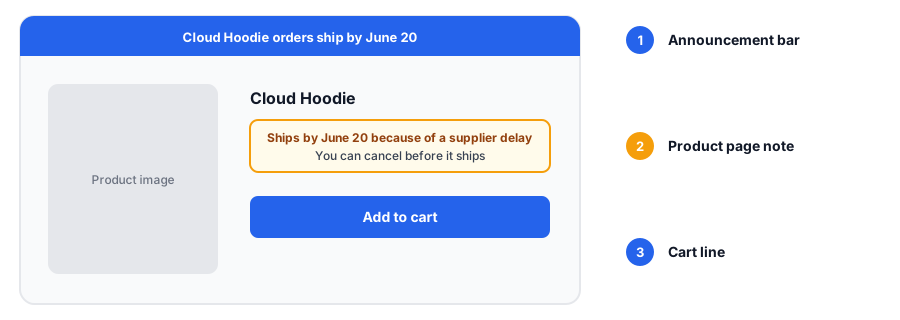
Where Each Message Belongs
The announcement bar reaches everyone on every page, so keep it short and put the scope first: what is delayed and the new date. The product page is where a shopper decides, so repeat the delay near the add-to-cart button, with a little more detail. The cart is the last chance to avoid a surprise, so state the delay again for any affected item. Many Shopify themes include an announcement bar section, but the setup differs by theme, so check yours before you plan the layout. If your message does not fit on a phone, shorten it.
Rules for Honest, Useful Delay Copy
- Be specific. Say which products and give a date or a range, not "delays possible".
- Say what is not affected, but only if you have checked. "Everything else ships as usual" must be true.
- Promise only what you will do. If you say you will email when the date changes, set a reminder to do it.
- Do not use the delay to push urgency or a discount that you would not otherwise offer.
- Set a review date when you put the banner up, and remove or update it when the facts change.
Rules about shipping estimates, delays and cancellation rights differ by country and by state. This post is general guidance and not legal advice, so check the requirements for the places where you sell.
Banner, Email or Reply: Which to Use
The banner tells people before they buy. Orders already placed need a message of their own: our out-of-stock customer email templates cover that, and the replies for "when will it be back in stock?" cover chat and DMs. If the delay comes from the holiday rush, the holiday stockouts guide and the holiday readiness audit help you plan cutoffs and checks. If you sell stock before it arrives on purpose, see back in stock alerts versus preorders.
When the Product Is Sold Out, Not Delayed
A delay banner is for products you can still sell. If the item is sold out, shoppers cannot order at all, and the banner has nothing to offer them. That is where Griffin, a Shopify back-in-stock app, helps: it adds a Notify Me popup or inline form to sold-out products. Shoppers sign up for the variant they want, and Griffin emails them when it is back. Signups are stored in Griffin's own records, and the free plan includes 100 notifications a month. Griffin does not add announcement bars, change shipping estimates or offer preorders, so use your theme or another tool for the banner, and our sold-out page checklist for what a sold-out page should do.
Delayed items keep selling with a banner. Sold-out items need a way to be told when they return. Griffin adds Notify Me to sold-out variants.
Install Griffin on ShopifyFAQ
How specific should a shipping delay banner be?
Name what is affected and give a date or a clear range. A banner that says shipping may be delayed leaves shoppers guessing, while one that says the Cloud Hoodie ships by June 20 lets them decide.
Do I have to give the reason for the delay?
No, and you should only name a reason that is true. A short, honest cause can build understanding, but a vague or invented one does more harm than none. The generator lets you leave it out.
When should I remove a delay banner?
As soon as the delay is cleared, and ideally on a date you set when you put it up. A banner that outlives the problem tells shoppers your site is not kept current.
Does Griffin add delay banners?
No. Griffin captures restock signups on sold-out products and variants and emails those shoppers when the item is back. It does not add announcement bars or change shipping estimates.
The Bottom Line
A good delay message names what is affected, gives a date and promises only what you will do. Use the generator, trim it to fit your theme and put a date in your calendar to remove or update it. Griffin is a Shopify back-in-stock app you can install from the Shopify App Store, free to start.