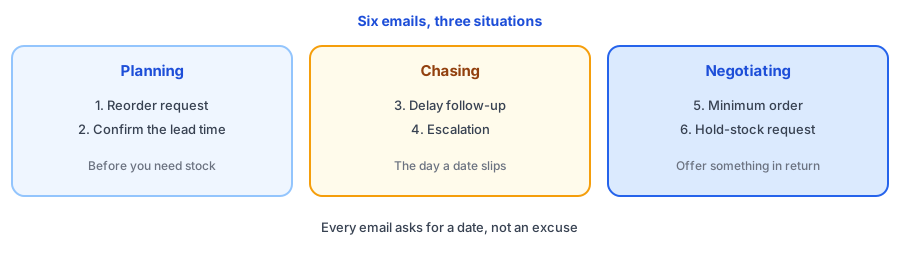
A late shipment is rarely a surprise to your supplier. It is a surprise to you, because nobody asked the right question early enough. The six emails below are for the moments that decide whether your shelves stay full: reordering, confirming a lead time, chasing a delay, escalating, negotiating a lower minimum and asking a supplier to hold stock. Each is short, specific and ends with a request for a date, not an excuse. Fill in your details once and copy any email that fits. This supplier email template for reorders keeps square brackets wherever only you know the answer. The names and numbers shown are examples.
The Supplier Email Generator
What Makes a Supplier Email Work
- One request per email. A message with five asks gets an answer to the easiest one.
- A date, not a range. Ask for the expected ship date, and ask what could move it.
- Your reason for asking. Suppliers prioritize when they understand what depends on the answer.
- A reply-by date for anything urgent, stated politely.
- Writing, not calls alone. If you speak by phone, follow up in an email that summarizes what was agreed.
Which Email for Which Moment
Use the reorder request and the lead-time check before you need stock, not after. Your reorder point depends on the lead time, so the numbers from the reorder point and safety stock calculator are only as good as the answer you get here. Use the delay follow-up the day a date passes, and the escalation only when the first follow-up gets no firm answer. The minimum-order email is a request, so offer something and be ready for a no. Ask for a hold only when you expect a spike, as in the seasonal inventory planner.
When the Supplier Is Someone Else's Warehouse
If you dropship or print on demand, delays happen outside your control and your customers still blame you. The same emails work, and the posts on dropshipping and print on demand explain how restock alerts fit when stock depends on a third party. Tell customers early too: the shipping delay banner generator writes site messages for a delay.
Keeping Customers in the Loop
While you wait on the supplier, shoppers still arrive at a sold-out page. Griffin, a Shopify back-in-stock app, adds a Notify Me popup or inline form to sold-out products. Shoppers sign up for the variant they want, and Griffin emails them when it is back. Signups are stored in Griffin's own records, and the free plan includes 100 notifications a month. Griffin does not email suppliers or track purchase orders. When a delay does cost you sales, write it up with the stockout postmortem template, and use the days of inventory left calculator to see how much runway the delay leaves you.
A supplier delay should not mean lost demand. Griffin captures restock signups on sold-out variants and emails them when stock arrives.
Install Griffin on ShopifyFAQ
How do I ask a supplier for a firm lead time?
Ask for an expected ship date instead of a range, say what you are planning around, and ask what could make it longer. Put the question in writing so you have a record you can refer back to.
What should I do if my supplier misses a delivery date?
Follow up promptly with specific questions: where the order is, the new ship date and whether a partial shipment is possible. If you do not get a firm answer, escalate politely, set a reply-by date and start planning for the delay.
Can I negotiate a lower minimum order quantity?
Often you can ask, especially if you reorder regularly. Offer something in return, such as a slightly higher unit price, a regular ordering pattern or split deliveries, and be ready to accept the minimum if the answer is no.
Does Griffin contact suppliers?
No. Griffin captures restock signups on sold-out products and variants and emails those shoppers when the item is back. It does not send emails to suppliers or track purchase orders.
The Bottom Line
Good supplier emails are specific, ask for a date and leave a record. Send the lead-time check early, follow up the day something slips and negotiate with something to offer. Griffin is a Shopify back-in-stock app you can install from the Shopify App Store, free to start.